


Contents
End-of-life Device Behaviour - PaperCut Version 26
This page applies to:

Last updated July 6, 2026
Contents
With the release of PaperCut MF Version 26, our End-of-Life (EOL) device policy has transitioned from the six-month communication roadmap phase into active policy enforcement. To ensure the security, stability, and integrity of your print environment, all identified EOL device types are now automatically disabled upon upgrading to v26.
What to Expect During the Upgrade
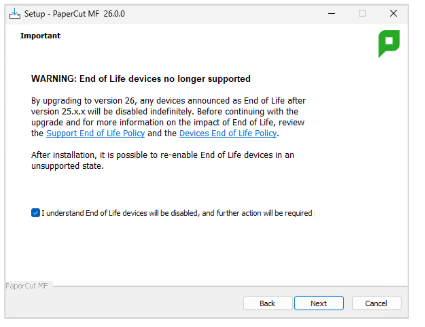
The PaperCut MF Version 26 installer will prompt for acknowledgement that EOL devices will be disabled indefinitely on upgrade. You must accept the new policy to continue with your setup.
Follow these steps to complete the installation wizard:
-
Open the PaperCut MF Version 26 installer.
-
Look for the warning box in the setup wizard.
-
Click the link to read the Support EOL Policy announcements and Devices EOL Policy.
-
Select the I understand End of Life devices will be disabled checkbox.
-
Click Next to finish your installation.
Your First Post-Upgrade Login
A message pops up on your very first administrator login. This quick notification alerts you that your legacy hardware has been set to disabled indefinitely.
The application server stops talking to these specific models immediately. They stay safely offline until you take action. You cannot add new EOL devices to your fleet.
On your first login to PaperCut MF 26 after upgrade, you will see the following warning:
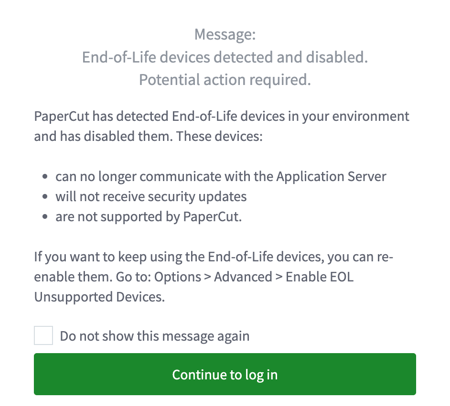
This notification will continue to appear on each admin login until it is explicitly dismissed.
What happen to EOL devices upon upgrade to MF 26?
When you upgrade to PaperCut MF 26, the following occurs automatically:
- All EOL device records are set to Disabled Indefinitely status
- The server ceases responding to check-ins or data requests from these devices
- EOL devices remain visible in the database but show as Disabled in all system views
- EOL devices are removed from the Add Device dropdown menu
- EOL devices are highlighted with a Red Bar in the Devices tab
Interim Operational Override
We recognize that immediate hardware updates are not always possible. If you update to MF 26 and you must keep these legacy devices running in the interim to avoid operational downtime, a manual override path has been built into it to re-enable them temporarily:
First-Time Login Warning: To make this transition as seamless as possible, upon your first administrator login following the upgrade, if any of your active devices were disabled by this policy, a prominent pop-up notification will immediately alert you and guide you directly to the override option once you’re logged in.
To access the override manually at any time:
Go to your configuration settings to unlock these units:
-
Log into your PaperCut admin console.
-
Click Options.
-
Click Advanced.
-
Scroll to the bottom to find the Enable Unsupported End of Life (EOL) Devices section.

-
Select the toggle setting to turn it on.
-
Read the support and security risk acknowledgement in the pop-up window.
-
If you agree, select the I agree checkbox.
-
Click Re-enable EOL devices to save your changes.

Any device that was disabled indefinitely will be re-enabled automatically when saved and EOL devices will re appear in the device creation dropdown.
Important Policy and Compliance Notes
Turning on this temporary toggle shifts technical responsibility to your organization. PaperCut provides zero technical support, security updates, or compatibility guarantees for these units. Future software updates may permanently stop these connections without any notice.
Activating this feature changes a few things in your admin console:
- Previously disabled EOL devices are restored to an enabled state.
- EOL device types reappear in the Add Device dropdown, labelled with an (EOL) suffix.
- A warning banner stays at the top of your Devices tab.
- A yellow alert triangle icon appears next to every EOL device name ⚠️.
- The system logs that EOL devices have been enabled in the Application Log, including;
-
- Timestamp
- Admin User ID
- IP Address
- A string confirming acceptance of the EOL Risk Disclaimer
-
We highly encourage you to chat with your reseller to plan your hardware upgrades soon! Reach
How to disable EOL device support again
- Navigate to Options > Advanced
- Uncheck the Re-enable unsupported legacy devices option
- Click Apply
EOL Device Types Table
OEM | Device Platform | MF Device Type | EOL Announcement Date | Last Order & | Last Enabled |
|---|---|---|---|---|---|
Samsung | XOA | Samsung (XOA) | 4/6/2024 | 31/12/2024 | 25.x.x |
Dell | AIP | Dell (AIP) | 4/6/2024 | 31/12/2024 | 25.x.x |
Canon | Gen2 | Removed from Product | 4/6/2024 | 31/12/2024 | 24.x.x |
Fuji Xerox | AIP | Fuji Xerox (AIP) | 4/6/2024 | 31/12/2024 | 25.x.x |
Lanier | SDK/J | Lanier (SDK/J) | 4/6/2024 | 31/12/2024 | 25.x.x |
Gestetner | SDK/J | Gestetner (SDK/J) | 4/6/2024 | 31/12/2024 | 25.x.x |
Ricoh | SDK/J | Ricoh (SDK/J) | 4/6/2024 | 31/12/2024 | 25.x.x |
Lexmark | LeS | Lexmark Printer(LeS) | 30/11/2025 | 30/6/2026 | 25.x.x |
Xerox | Network Accounting | Xerox (Network Accounting / JBA) | 30/11/2025 | 30/6/2026 | 25.x.x |
Xerox | Secure Access EIP 1.0+ | Xerox (Secure Access EIP 1.0+) | 30/11/2025 | 30/6/2026 | 25.x.x |
Toshiba | V1 | Toshiba | 30/11/2025 | 30/6/2026 | 25.x.x |
Toshiba | V2 | Toshiba v2 | 30/11/2025 | 30/6/2026 | 25.x.x |
Toshiba | eConnect | Toshiba (eConnect) | 30/11/2025 | 30/6/2026 | 25.x.x |
Toshiba | eConnect | Toshiba (eConnect. HTML Browser n2.0+) | 30/11/2025 | 30/6/2026 | 25.x.x |
Toshiba | Eraser | Toshiba Eraser | 30/11/2025 | 30/6/2026 | 25.x.x |
HP | Chai | HP (Chai SOE DSE) | 30/11/2025 | 30/6/2026 | 25.x.x |
HP | Futuresmart Legacy | HP FutureSmart (Legacy) | 30/11/2025 | 30/6/2026 | 25.x.x |
HP | OSA | HP (OSA) | 30/11/2025 | 30/6/2026 | 25.x.x |
Sharp | OSA (Legacy) | Sharp OSA | 30/11/2025 | 30/6/2026 | 25.x.x |
Sindoh | Open API | Sindoh (OpenAPI 4+) | 30/11/2025 | 30/6/2026 | 25.x.x |
Sindoh | API | Sindoh (API1) | 30/11/2025 | 30/6/2026 | 25.x.x |
Konica Minolta | OpenAPI | Konica Minolta (OpenAPI 2.3+) | 30/11/2025 | 30/6/2026 | 25.x.x |
OKI | Open Platform | OKI (Open Platform) | 30/11/2025 | 30/6/2026 | 25.x.x |
OKI | SXP2 | Removed from Product | 30/11/2025 | 30/6/2026 | 24.x.x |
Category: Reference Articles
Subcategory: Devices
Comments
Comments are not available in this preview environment. On papercut.com, this space shows the live Disqus comment thread for this page.