


Contents
User details missing from copy jobs on Toshiba devices in the Administrator interface Job Log
THE PAGE APPLIES TO:




Last updated February 3, 2026
Contents
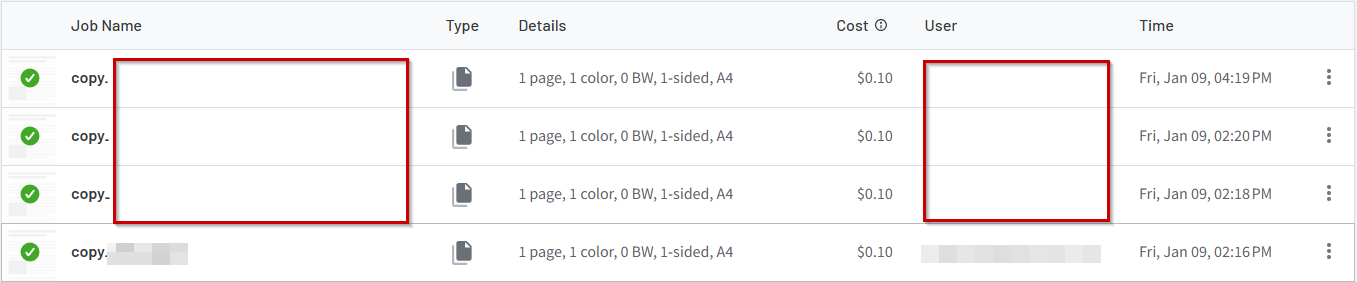
“I’m a Systems Administrator of PaperCut Hive, when I check the Job Log in the Administration Interface, the copy jobs from my Toshiba devices are not showing the user who did the copy. ”
Introduction
Newer Toshiba devices now come with a Log Data Privacy Setting that no longer logs the logged in user against native copy jobs. This only affects Toshiba devices that have the PaperCut Hive Full Embedded Application installed.
A user logs into the device, selects Access Device Functions and performs a Toshiba copy job. When the job gets reported by the device to PaperCut, it does not include the username of the logged in user. Therefore the user will not be tracked or charged (if cost tracking is set up), as PaperCut does not know who to credit the job to.
Resolution
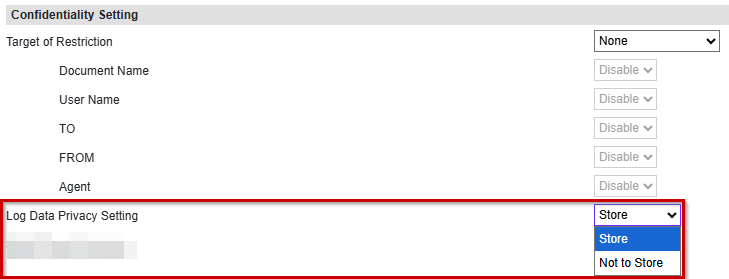
The Log Data Privacy Setting can be configured to track the user by performing the following:
1. Log in to the Toshiba TopAccess Administration web interface (usually actioned by entering the IP address of the printer into a web browser) as the Admin user.
2. Under Administration, click Setup > General.
3. Under Confidentiality Setting, find option Log Data Privacy Setting and select Store.
4. In the top bar, click Save.
 This information has been included in the Toshiba PaperCut Hive Full Embedded Application Manual.
Category: PaperCut Pocket and Hive Articles
Subcategory: Devices (PaperCut Hive), User Management, Administration
Comments