



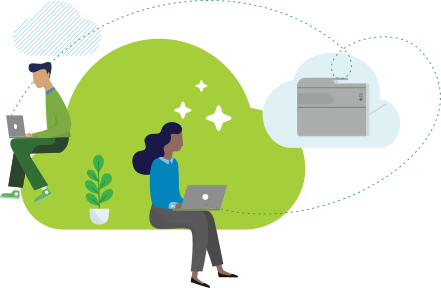
‘What is cloud print?’ sounds like a simple question, but there’s actually quite a lot to unpack. Single tenant vs multi-tenant. Private vs public. On-premise vs hybrid cloud solutions.
Let’s take it from the top…
What do we mean when we say ‘cloud’?
At its most basic level, the cloud is just a way to describe the concept of a big online storage and service space – one you can access from anywhere, as long as you have the internet.
Instead of running your print server on-premise, or storing your data in a hard drive, everything’s managed through ‘the cloud’, which is really just a bunch of super-secure computers, located in hosting regions all over the world.
Fun fact: It’s called the ‘cloud’ because, when people first drew diagrams of computer networks, they used fluffy cloud shapes to represent all the connections you (the user) couldn’t see.
The history of cloud print
You can trace cloud print technology back to the early 2000s, when companies like HP and Lexmark began integrating internet-connected printers with some (super basic) cloud functionality.
But really it was Google Cloud Print in 2010 that kicked off the cloud printing boom. This was a free service that allowed users to connect printers to Google’s cloud servers, facilitating printing from any device – pretty groundbreaking stuff at the time.
Google Cloud Print was shut down in December 2020, but there are plenty of great alternatives out there, like PaperCut’s very own Mobility Print.
How does cloud printing work?
Let’s dive into more detail. As we mentioned, the cloud is simply a collection of servers, scattered around the world, and accessible to anyone with an internet connection.
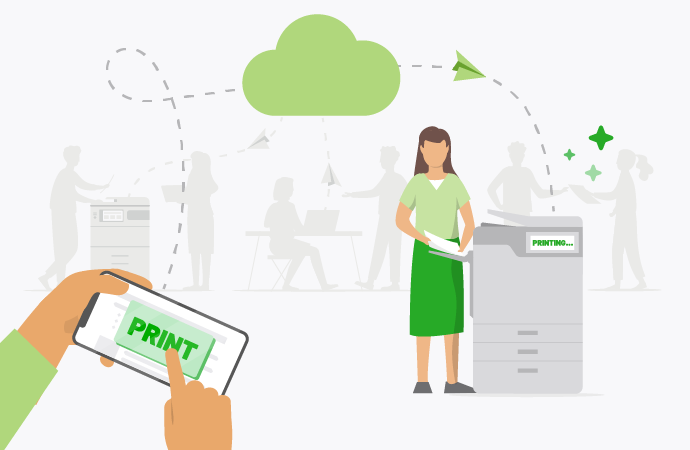
But how does that work exactly? Well, when you print through the cloud, the job bounces from your device to the cloud print server, which routes the job to the appropriate cloud-friendly printer.
Before the job is sent to the cloud server, it’s encrypted, and the cloud service verifies that the user is good to go. The cloud service then processes the job, queues the job, and determines the correct printer (based on proximity or predefined settings). The printer then receives the job, decrypts the information, and prints the document - instantly. Neat, huh?

What are your reasons for moving to the cloud?
No print server required
By shifting your print environment to the cloud, you can ditch those expensive, bulky, hard-to-maintain print servers.
Cut costs
Cloud print services tend to be cheaper to maintain than on-premise ones.
We’ve broken this down in more detail here
Free up time for IT
With centralized management, and the ability to sync print drivers automatically, cloud print is a dream for IT departments.
Scale like a boss
Cloud printing comes with automatic software fixes and level-ups right out of the box. It’s also super scalable.
Easy to use
Ease-of-use is underrated. With cloud print, users can have the same print experience from any location or device, as long as they’ve got internet access.
Why do people migrate to the cloud?
There are a bunch of reasons people move their print environments to the cloud: easier administration, centralized print management, fewer overheads, and security. But most of them come down to cost.
Although they require a regular subscription payment, cloud print services generally work out much cheaper than on-premise solutions. There’s no upfront investment in hardware, no costly server maintenance, and most services are offered on a pay-as-you-go model, which gives your finance team some flexibility.

Some common cloud discovery questions
Are you planning on moving your print solution to the cloud? If so, great! You’ll be joining most of the big companies out there. Before you pull the trigger though, there are a few things you need to keep in mind.
Check out our comprehensive Cloud Print Migration guide for more information.
Not sure if you’re ready for that big cloud migration? That’s okay. It can be a daunting prospect. Here are a few questions to help steer you in the right direction:
- What IT infrastructure do you currently have, and how is it running?
- What are your future plans, in terms of scaling your print environment?
- Are your servers on-site, or in a separate data centre?
- Do you own the data centre, or are you renting it? What are the ongoing costs?
- Are you looking for simple cloud hosting, or an end-to-end cloud print management solution?
- Do you currently have third party integrations that need to be factored in?
The answers to these questions will help you decide if you’re ready for cloud print.
Got more cloud print discovery questions?
Chat to one of our experts.
The 4 types of cloud print solutions
The cloud isn’t a one-size-fits-all thing. In fact, when it comes to cloud printing, there are technically four ways you can go. None of these are ‘best’ as such. It’s more about what’s best for you.
Private cloud, public cloud, hybrid models…they all have their pros and cons. It’s all about what your business needs.

Self-hosting cloud print
Where you host the cloud print service on your own server infrastructure.
Pros
-
You get complete control over data and infrastructure.
-
High customization to meet specific organizational needs.
-
No reliance on third-party providers.
Cons
- High upfront costs, plus ongoing server maintenance.
- Requires a lot of in-house IT expertise.
- Limited scalability, compared to cloud-based alternatives.
Good for: Healthcare, government and finance, where strict data laws might necessitate an in-house solution. Or any big enterprise with a killer IT department.
Single-tenant private cloud
Your own private cloud environment, hosted by a third-party provider.
Pros
- Dedicated resources usually means better performance.
- Enhanced data security and privacy compared to multi-tenant solutions.
- Everything’s managed by a provider which reduces the burden on IT.
Cons
- Usually more expensive than multi-tenant SaaS solutions.
- Can trigger vendor reliance, which restricts your ecosystem.
- Not really cost-efficient for smaller organizations.
Good for: Legal, research or defence sectors, where the focus is on security and performance. Or any medium-to-large organization that wants a tailored solution.
Hybrid cloud printing
A mix of on-premise and cloud print services running side-by-side.
Pros
- Flexibility to handle local and remote printing.
- Can be a good way to handle gradual cloud migration.
- Reduces your reliance on internet uptime.
Cons
- More complex to set up and maintain, at least compared to pure cloud.
- Requires a lot of coordination between on-premise and cloud resources.
- Can be expensive to run dual infrastructures side-by-side.
Good for: Hybrid can be a nifty stop-gap, while you manage a slow cloud migration. It’s also good for education organizations, who need both on-site and remote printing solutions.
SaaS multi-tenant cloud print
A fully-managed cloud printing service, shared by lots of organizations.
Pros
- Cost effective and easy to scale as your business grows.
- Minimal IT involvement required especially for setup and maintenance.
- Frequent updates, patches and new products from the CSP (Cloud Service Provider).
Cons
- Shared infrastructure may come with privacy concerns.
- Limited customization, at least compared to single-tenant setups.
- Reliance on vendor availability and support, which isn’t always a given.
Good for: A great option for small businesses, startups and medium-sized enterprises. If you want hands-off cloud printing, and great scalability, go with SaaS multi-tenant.
Public vs Private cloud
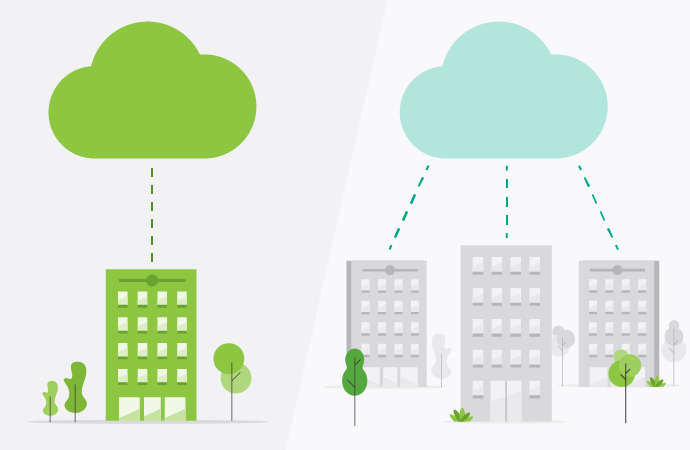
Just to confuse you further, there’s also a big difference between the ‘public’ and ‘private’ cloud. This basically comes down to who owns the cloud space, and who gets to use it.
Public Cloud
Think of public cloud services as shared cloud services. They’re offered by providers (like AWS, Google or Microsoft) to hundreds of companies at the same time. It’s kind of like renting an apartment in a big building – lots of people live there, but everyone has their own space.
With the public cloud, you’re completely removed from your data. It’s physically stored in hosting regions all over the world. But that means you’re also removed from the burden of maintaining those servers, which is why public cloud stuff is so popular with smaller companies. Especially when security and customization aren’t big factors.
Key features
- Shared resources: Everyone shares computing power, storage and service resources.
- Cost effective: With the public cloud, you only pay for what you use.
- Hands off: Everything’s managed by the provider, so maintenance is zilch.
Pros
- Shared, scalable infrastructure that you don’t have to maintain.
- Multi-tenant architecture makes it cheaper for everyone.
- Pay-as-you-go means you only pay for what you use.
Cons
- Because it’s a shared resource, you have less control over your data.
- Hard to troubleshoot problems, since you don’t own the infrastructure.
- No control over maintenance or new feature releases.
Private cloud
The private cloud, as we mentioned above, is a cloud environment dedicated entirely to one organization. It’s your own private little bit of cyber real estate. Private cloud setups can be hosted on your premises (for extra security) or by a provider.
If the public cloud is owning an apartment in a big building, the private cloud is owning a house – with a big fence, and no noisy neighbours.
Private cloud environments tend to be more purpose-built, which means they’re more customizable. This is great for complex organizations that need a bespoke solution. And while all cloud technology is safe, private clouds are extra safe, which makes them the go-to choice for many finance, healthcare and government organizations, who really need top-level security.
Key features
- Exclusive use: All the cloud resources are reserved for you. No sharing.
- More expensive: Private clouds come with a premium price tag.
- Customizable: Design your ultimate cloud print environment.
Pros
- Dedicated resources and infrastructure.
- The highest level of cloud control and security.
- Ability to scale without purchasing additional hardware.
Cons
- You’ll need a sysadmin, if one’s not provided by the CSP.
- Same security as on-premise servers, but often a bit slower.
- More costly to setup and maintain than an out-of-the-box public solution.
What are single tenant and multi-tenant applications?
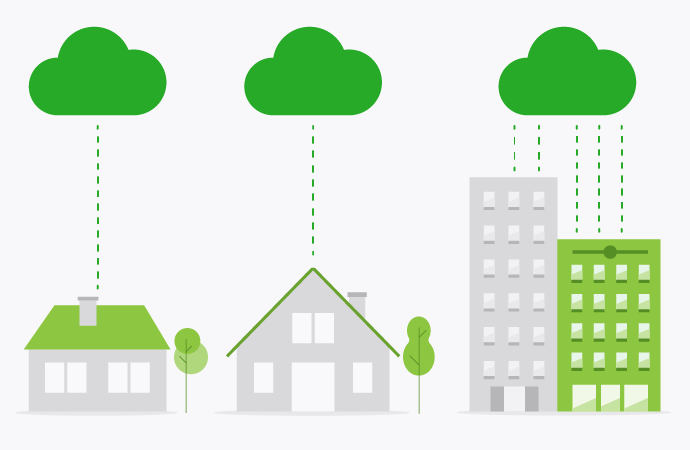
‘Single tenant’ and ‘multi-tenant’ are two other terms you’ll hear thrown around, and they’re more-or-less another way of saying ‘private’ vs ‘public’ cloud. In their simplest terms, single tenant cloud apps represent one application instance per customer, whereas multi-tenant means you share that resource.
Multi-tenant cloud apps include everything from Salesforce to Office 365 to GSuite. They’re usually cloud-hosted and managed for you, and most of them run on an SaaS, pay-as-you-go model. PaperCut MF (in its default config) is a single tenant application, whether you host it on-premises or the cloud. Our cloud-native products, on the other hand, like PaperCut Pocket and PaperCut Hive, are built from the ground-up as SaaS/multi-tenant applications.
Neither single tenant or multi-tenant is better, per say. They’ve both got their pros and cons.
Single tenant hosting
Pros
- Lots of control over admin, security and data segmentation.
- Can be hosted (if built with Web Services).
- Usually browser-based and easy to use.
Cons
- More expensive to set up and maintain.
- Limited scalability, at least compared to multi-tenant apps.
- More hands-on IT involvement than multi-tenant applications.
Multi tenant hosting
Pros
- Very cost efficient, with a flexible pay-as-you-go model.
- Quick scaling and super elastic infrastructure.
- Regular updates, fixes and new feature rollouts.
Cons
- Limited customization. Generally it’s one-size-tries-to-fit-all.
- Compliance and data privacy concerns.
- Performance is dependent on a bunch of external factors.
Want to learn more about print server vs serverless printing?
Cloud print migration guide: moving print management from on-premise to the cloud
Cloud print migration is simply the act of moving your existing print infrastructure onto the cloud. Whether that’s a self-hosted or multi-tenant cloud setup, doesn’t matter. Most of the steps are the same.

How to migrate from on-premise to self-hosted servers
Migrating from on-premise print servers to a self-hosted cloud environment requires a lot of planning (check out this article for more info).
Here are the basics:
How to migrate from on-premise to fully-hosted servers
Going from on-premise to fully-hosted cloud print services can be a bit of a shock. You’re giving up maximum control for a multi-tenant, third party solution. Here’s how to do it.
Cloud migration checklist
These are the basic steps you’ll need to take to complete a cloud migration with PaperCut.
We’ve gone into each one in more detail over here.

Preparation phase
- Set up and test the print queues on the new server.
- Install the same version of PaperCut on both servers.
- Review and copy the server properties file to the new server.
- Migrate other PaperCut components, as needed.
Cutover phase
- Inform users of the scheduled downtime for the migration.
- Deactivate the installation on your old server.
- Migrate the database to the new PaperCut server.
- Apply your licence or subscription to the new server.
- Power off the old server, or disable the network interface.
Want the quickest way to get started with cloud print enablement?
Try our free cloud product, PaperCut Mobility Print.
What’s the difference between cloud print enablement and cloud print management?
Technically speaking, we should also draw a line between software that enables printing via the cloud, and software that helps you manage printing via the cloud. They sound similar, but they perform very different functions.
Cloud print or cloud printing: When you hear cloud print, you’re really talking about cloud print enablement. That’s any software or service that lets you remote print over the internet via the cloud.
Cloud print management: this is the next level on top. Cloud print management refers to the tracking, monitoring and admin of cloud print environments. This is your cloud print dashboard.
Are you looking for cloud print enablement or cloud print management? Or both?
Before you do anything else, ask yourself: are you looking for a simple solution that lets you print via the cloud (in which case, say hello to PaperCut Mobility Print) or are you looking for software to help you juggle cloud print user settings, print queues, server loads, print quotas and so on? Or how about both?
If you decide to pull the trigger on cloud print management, you need a solution that’s cost effective, easy to use, secure, scalable and compatible with everything. Those are the boxes most organizations are looking to tick.
The thing is, a lot of public cloud print solutions can be slow, insecure, and tie you down to a specific manufacturer. So it’s worth doing your research and chatting to as many vendors as possible. Start with us.
How does cloud print management actually work?
Cloud print management is the process of controlling, monitoring and optimizing an organization’s print environment through a cloud-based platform. So what does that actually mean?

- Well, first printers are connected to a cloud print management platform via a software connector, firmware update, or direct integration.
- Once they’re registered, the platform identifies each printer’s capabilities (e.g. color printing or duplex) and makes those available to authorized users.
- To print a document, users must first login to the print management platform, usually through some combination of password, single sign-on (SSO) or PIN code.
- Once they’re authenticated, users can send print jobs from their device to the cloud platform through a simple interface or mobile app.
- The job is queued by the print management software, encrypted at both ends, and routed to the appropriate printer.
- In an ideal world, users release their print jobs at the MFD by authenticating themselves again. This is known as secure print release.
- While all this is going on, the platform provides your IT department with real-time analytics on print volumes, user trends, cost breakdowns and even environmental metrics, like ink and toner levels.
The idea is to give your organization maximum control over their print environment, all from one, centralized location (your print management dashboard). Short version: print management software is like the middle man, sitting somewhere between the user, their device, the cloud server and the printer. It’s the thing that keeps the print environment running smoothly.
Is your business ready for cloud print management?
This is a question only you can answer, and it’ll depend on all sorts of factors, from your budget to your on-premise server infrastructure. Cloud print is more-or-less industry standard for many medium-to-large organizations, but this doesn’t mean it’s right for everyone. And, as we’ve covered already, ‘cloud printing’ can mean all sorts of different things.
Here are a few signs you might be ready to make the jump to cloud print management:
-
You’re already using the cloud
The cloud is one of those things that becomes more valuable the more you use it. If you’re already using the public cloud for day-to-day business functions like storage, collaboration, video conferencing, file sharing and project management, then it’ll be super easy to layer cloud print management on top. Check out PaperCut’s (exhaustive) list of integrations and add-ons for more info.
-
You’re growing fast
Small businesses who have never dabbled in this stuff are usually the ones with the most to gain from cloud print management. This is especially true for organizations who are growing quickly, and need their print infrastructure to scale at warp speed. With its low cost-of-entry, endless scalability and ease of deployment, cloud print management is perfect for businesses on the up and up.
-
You’ve committed to hybrid work
The recent shift towards remote and hybrid work has meant that many organizations are looking for print solutions that are more…bendy. Cloud print management fits that bill. We’ve written tons of stuff on the benefits of BYOD and cloud printing, but if you’re juggling multiple devices, users and locations, cloud print is a great way to untangle your system (and rollout print drivers simultaneously).
-
You need a secure solution
If you work in the healthcare, finance, legal or government sectors, your print environment more than likely has to comply with all sorts of data protection and privacy regulations. And that’s as it should be. The good news is that cloud print management can help you tick many of those boxes, thanks to end-to-end encryption, user authentication, secure print release and digital watermarking.
What are the benefits of cloud print management?
Before cloud printing came along, complex print environments were exclusively handled by on-premise print servers (and some very stressed IT teams).
It’s funny though, while cloud technology gained traction across the internet, printing remained largely a physical, on-premise thing for a long time. It’s only in the last few years that we’ve seen most companies jump on the cloud print wagon.
Why? Well, partly this was down to bureaucratic stuff, like fixed terms leases on commercial printers. But it’s also been a cultural shift. Organizations have now fully embraced the cloud in almost every other area of business: it only made sense for printers to be next.

Here are a few benefits of cloud print management:
Simplified IT management: With your entire print environment on a single dashboard, your IT department can manage all printers, devices, users and queues from one convenient location. A huge time-saver. Couple that with automatic updates, and the fact sysadmins don’t have to spend their days wrangling physical print servers, and you can see why the cloud starts to look quite attractive.
Cost efficiency: Replacing your on-premise servers with a cloud-based solution means lower hardware, energy and maintenance costs, which is always nice. The added benefit of print management is that you start to really track your costs, and that leads to more efficient printing. With PaperCut, for example, you can see which departments are eating up your budget, adjust print quotas, and set duplex printing as default.
Enhanced security: This one’s not a slam dunk, since technically on-premise print infrastructure offers a greater level of hands-on physical control. But cloud printing, in general, comes with a host of great security features you won’t find anywhere else: end-to-end data encryption, user authentication and multi-factor ID, detailed audit trails of every single print job, secure print release, digital watermarks, real time intrusion detection, and more.
Increased flexibility: You can’t predict the future, and more and more organizations are valuing flexibility above all else when it comes to print infrastructure. Cloud printing not only supports remote and hybrid print environments, allowing staff to print from anywhere, on any device, but it also offers great out-of-the-box BYOD support, plus simple scalability, if you need to bring on more servers. Don’t forget the convenient pay-as-you-go SaaS model, either.
Environmental sustainability: The cloud isn’t exactly carbon neutral (some estimates say the cloud now has a bigger footprint than the airline industry) but it can help you print less, which is always good for ESG. Cloud-friendly features like pull printing, print quotas, consumable alerts, automated resupply and print tracking will help you print more efficiently. And efficient printing is sustainable printing.
Cloud print management in education
Education institutions (schools, universities and so on) face a few unique challenges when it comes to their print environment. For one thing, there are distinct user classes (students, faculty, guests etc.) and each one needs its own print permissions and usage quotas. Printing tends to be highly dispersed, too, with big campuses, lots of MFDs, and remote printing going on ‘round the clock. Lastly, you have to factor in seasonal server loads, like around exam time, when everyone’s trying to print at once. Mix this all together and you’ve got a seriously complex print environment.
Here’s how to know if your school or university is suited for cloud printing:


8 reasons why cloud print works in education
Cloud print management in healthcare
Healthcare is one of those industries, like finance and the law, where data privacy and security aren’t just nice-to-haves, they’re regulatory necessities. But cloud print solves a lot of the problems healthcare organizations tend to have when it comes to printing. It’s secure and HIPAA-compliant (as long as you find the right platform/vendor). Doctors, nurses and administrators can print from anywhere, on any device, with robust authentication protocols and job tracking. And it’s easy for IT to manage, which is handy when you have printers scattered across different departments. With centralized cloud-based control, sysadmins can roll out driver updates, firmware patches, and new user settings with the click of a mouse.
Here’s how to know if your hospital or clinic is suited for cloud printing:
You’re a specialized organization
If you have unique privacy and data safety requirements, cloud print is the way to go.
You need a secure environment
End-to-end encryption, audit trails, digital watermarking. With the right settings, cloud print can easily be HIPAA-compliant.
You scan a lot
Cloud print management platforms, like PaperCut, usually come with integrated scanning.
You need scan-to-fax functionality
Cloud print is fully compatible with scan-to-fax, allowing you to run complex hardware setups.
You’ve got a shared office
Set user permissions, assign printers to certain tasks, and track everything in real time.

Cloud print management in real estate
Real estate professionals are always on the move, which is where the print-from-anywhere nature of cloud print really starts to shine. Print from your phone, your tablet, your laptop, a café, the office – anywhere you want. Cloud printing also allows easy document access, with agents able to print contracts and client files to any office printer. This saves on travel and admin time, streamlining your overall print environment. With secure print release, you can also make sure that sensitive client information doesn’t end up in the wrong hands.
Here’s how to know if your agency is ready for cloud printing:
You run a franchise model
With cloud print, you can have one system, one print environment, across several offices.
You’ve got a mobile workforce
As long as your agents can access the internet, they can access a printer.
You need BYOD enablement
Manage your entire BYOD ecosystem through your cloud print dashboard.
You frequently need to scan
Integrated scanning makes it easy to scan and save invoices, contracts and references.
You need reporting tools
Easy reporting and account management makes quotas and chargebacks a breeze.


Cloud printing for the hybrid workforce
Cloud print management in SMB
For small and medium businesses (SMBs) money is tight, so it’s important to squeeze every dollar you can from your print environment. This is why so many smaller businesses are moving to a SaaS multi-tenant cloud print model. For one thing, the upfront cost is minimal, and you only pay for what you use. Secondly, you take IT management more or less out of the picture (you don’t need to be a sysadmin to run a simple print management dashboard). Lastly, cloud printing is great for shared environments, thanks to features like secure print release and user authentication protocols. Who needs on-premise print servers when you’ve got CSPs to take it off your hands, right?
Here’s how to know if your SMB is ready for cloud printing:
You’ve got a smaller office space
Cloud print is great for anything from 1-2 locations to 25-30 tenants.
You’ve got a dynamic user base
Easy onboarding and BYOD-compatibility mean users can print from any device.
You need reporting data
If you’re running a chargeback program, cloud print can help you track usage in real time.
You need something secure
Next to on-premise servers guarded by German Shepherds, cloud print is the safest commercial print solution.
You like add-ons
Extend your functionality with a huge list of integrations and cloud-based add-ons.

Learn more about cloud printing for SMBs
No print servers? No worries.
PaperCut Hive was built from the ground-up to be an end-to-end, cloud-native print solution.
Want to learn even more about cloud printing? We admire your stamina. For more in-depth info on how to get started, check out our free Cloud Printing eBook.
It’s got everything you ever wanted to know about cloud printing (and probably some stuff you didn’t)
Speak to an expert
To chat about cloud print, and how it might be a good fit for your organization, reach out to our friendly team.