


-
Prevent unauthorized user access to MFDs
-
Enable secure Find -Me printing for your users and reduce waste and cost
-
Print jobs are encrypted in transit
-
Print jobs can be watermarked and digital signatures applied
-
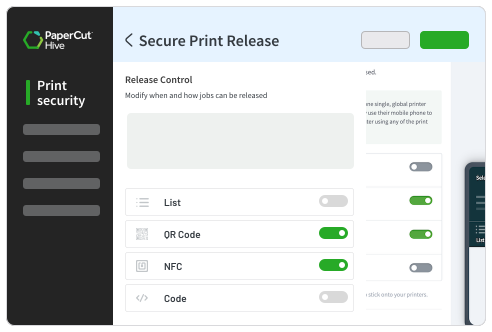
Secure print release – Ensure users collect only their own print jobs, reducing waste and enhancing security.
-
Easy deployment – Quickly set up and manage Brother printers with PaperCut’s streamlined installation process.
-
Print Tracking – Monitor print job activity.
-
Cost-saving policies – Reduce unnecessary printing with print policies and enforced rules.

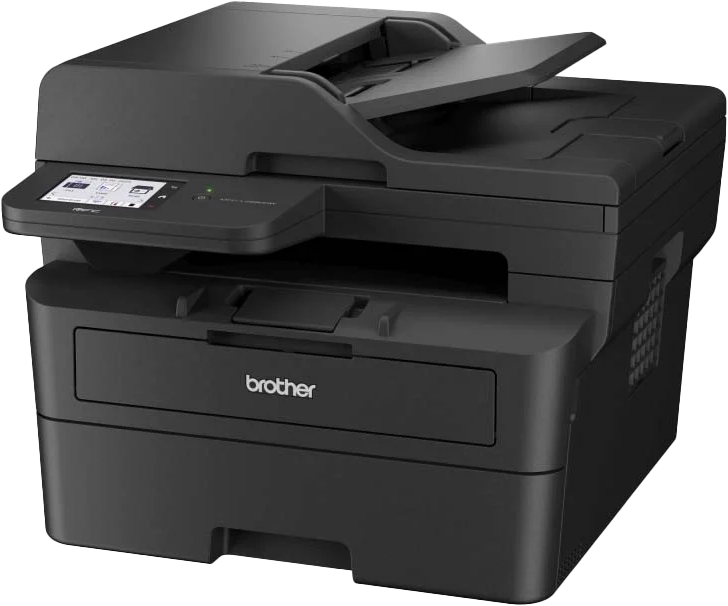
PaperCut integrates with Brother Multifunction Printers providing tracking, charging, and billing of your printing
SELECT ONE


Smart print management made simple
PaperCut integrates with Brother multifunction printers (MFDs) to provide essential tracking and print management features, helping organizations reduce waste, improve security, and manage print costs.
While Brother devices don’t support every advanced PaperCut feature with a native PaperCut embedded app yet, they still offer a reliable and efficient experience for everyday printing needs.
Key Features for Brother Devices
View all features for Brother
Lite Release App
Logging in
Log in with access code
 Using the access code received via email when setting up.
Using the access code received via email when setting up.

Request for access code
If a user goes to the device and can't remember their access code, they can resend it from the device by their email address
If a user goes to the device and can't remember their access code, they can resend it from the device by their email address
Lock device access
Access to the device can be restricted to certain times for specific users.
Access to the device can be restricted to certain times for specific users.

Swipe card support
Users can self-register a swipe card and use the card to log into the MFD.
Users can self-register a swipe card and use the card to log into the MFD.
Printing
Release a print job(s)
Release a print job sent to the PaperCut Printer
Release a print job sent to the PaperCut Printer
Thumbnail preview of print jobs at the MFD
Display a thumbnail image of print job prior to release
Display a thumbnail image of print job prior to release
Delete a print job(s)
Delete a job shown in the MFD list
Delete a job shown in the MFD list
Notifications at the MFD
Some devices allow for notifications, such as a prompt to convert to duplex, at the MFD
Some devices allow for notifications, such as a prompt to convert to duplex, at the MFD

Pull Delivery
PaperCut Hive’s Pull Delivery option enables supported MFDs to pull print jobs from the cloud at release time.
PaperCut Hive’s Pull Delivery option enables supported MFDs to pull print jobs from the cloud at release time.
Integrated Scanning
Scan to Cloud Storage
Enable users to scan documents to cloud storage. Available for: Google Drive, DropBox, Box, Evernote, Sharepoint, OneDrive, pCloud
Enable users to scan documents to cloud storage. Available for: Google Drive, DropBox, Box, Evernote, Sharepoint, OneDrive, pCloud
Scan to Email
Give users the option to scan a document to their email
Give users the option to scan a document to their email
Allowed Email Domains
For scan-to-email, admins can make the 'to' field editable by the user. This option allows them to lock the user input to only specific email domains.
For scan-to-email, admins can make the 'to' field editable by the user. This option allows them to lock the user input to only specific email domains.
Metadata Capture Fields
The option to add additional input fields for each Scan Action to prompt users to enter metadata at the device. This can then be delivered with the scan in JSON or XML format.
The option to add additional input fields for each Scan Action to prompt users to enter metadata at the device. This can then be delivered with the scan in JSON or XML format.
OCR
Give users the option to recieve a text searchable document when scanning
Give users the option to recieve a text searchable document when scanning
Scanning automations
Enable auto creation of folders, subfolders, email subjects, and file names on the spot, while users scan at the MFD. Made possible with Custom Fields variables
Enable auto creation of folders, subfolders, email subjects, and file names on the spot, while users scan at the MFD. Made possible with Custom Fields variables
N/A
Device functions
Track & control copying at the MFD
Track and control native device copy jobs and on-device print jobs
Track and control native device copy jobs and on-device print jobs
Copy Control
When a user’s balance is depleted, PaperCut Hive will stop any ongoing copy jobs for the user, and prevent them from starting any new jobs.
When a user’s balance is depleted, PaperCut Hive will stop any ongoing copy jobs for the user, and prevent them from starting any new jobs.
Track & control scanning at the MFD
Track and control native device scan jobs
Track and control native device scan jobs
Track & control faxing at the MFD
Track and control native device fax jobs
Track and control native device fax jobs
Email address field populated for native scanning
When a user logs into the MFD, their email address is automatically populated in the email address field ready for native scanning
When a user logs into the MFD, their email address is automatically populated in the email address field ready for native scanning
Setup
One-Click Embedded Install & Uninstall
Remote installation of the embedded software from the PaperCut Hive admin console.
Remote installation of the embedded software from the PaperCut Hive admin console.
Edge Mesh independent device functioning
This manufacturer can operate independently from the edge mesh. An online edge node with access to the printer is not required for login, card swipe, or scanning.
This manufacturer can operate independently from the edge mesh. An online edge node with access to the printer is not required for login, card swipe, or scanning.
A choice of data center location
Choose from 4 regions: UK, Europe, USA, and Australia.
Choose from 4 regions: UK, Europe, USA, and Australia.
Supported
Not supported
On the roadmap
The PaperCut Hive printer app supports Brother devices with the following attributes:
| SUPPORTED FEATURES | |
|---|---|
| HIVE - FULL EMBEDDED APP | No |
| HIVE - INTEGRATED SCANNING | No |
| HIVE - LITE RELEASE APP | Yes |
Please contact your PaperCut Hive Reseller to confirm PaperCut Hive is supported on your Brother
Explore PaperCut on all Brands


