


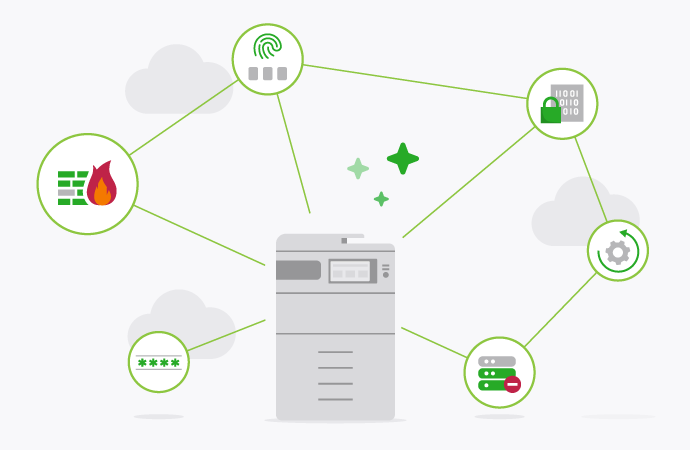
Security is baked into every line of PaperCut code – it has to be. Network printer security is a fundamental building block of your print infrastructure. We couldn’t transfer and print files online without it.
Hackers see these devices as an overlooked backdoor to your most sensitive data.
Network security evolves as new threats emerge, so your defense strategy can’t be static. With the average cost of a data breach sitting at US$4.45m, securing your print infrastructure’s a high-priority task. Here’s how you can lock down your network printers today.
What is network printer security?
Multi-function printers are essentially computers. At least, that’s how hackers see them, and they represent an often-overlooked backdoor onto your network. Think about it: everyone knows about cloud security and encrypted file transfers, but hardly anyone talks about the humble office printer.
Network printer security is simply another branch of your cyber defense strategy: it’s how you safeguard your online or direct IP print network from penetration or interference.
Phase 1: Implement robust authentication
First step: authentication.
You’ve got to have visibility over every authorized person on your network. Authentication ensures that only verified staff can access your Multi-Function Printers (MFDs). We recommend using one of these common methods to lock down access:
Usernames and passwords
The default authentication method, and the bare minimum of what you should be doing. Users should only be able to print and send jobs after entering their credentials from an external directory like Active Directory before they can print. This ensures every job’s tied to a verified account.
PIN numbers and swipe cards
IDs and PINs are often easier for people to remember than long passwords. Alternatively, you can use Radio Frequency Identification (RFID) swipe cards if your MFD supports them. It’s a faster way to authenticate without the desk-side friction.
This will obviously depend on your printer model, since not all MFDs will support swipe card authentication.
Multi-Factor Authentication (MFA)
Ideally, you’ll want to run two-factor or multi-factor authentication. This combines two methods, like a swipe card and a PIN. This way, a lost card won’t lead to a breach. It’s the current standard for modern print security.
You can read more about MFDs and 2FA over here.
Phase 2: Deploy secure print release
In most printer networks, when a user prints from an application, the job automatically flows through to the MFD, which starts printing directly to the printer’s tray, where they sit unguarded. This is a massive security risk, as anybody can pick up sensitive documents.
Instead, you should implement Secure Print Release to keep your data safe. With this feature, jobs are only printed when the person arrives at the machine and verifies their identity.
It stops the “print and sprint” habit and ensures documents aren’t forgotten. It’s a simple change that’s highly effective for privacy compliance.
Phase 3: Encrypt print data at every stage
Your print jobs have to be encrypted while they’re moving and while they’re sitting on the server. If your print management app doesn’t handle this as standard, you’ve got a problem.
Use these protocols to keep your data unreadable to prying eyes:
Spool file encryption
Don’t forget about data at rest. Organizations wanting to safeguard information in the hold/release queue use spool file encryption. It adds an extra layer of defense specifically for your print servers. This protects data even if the server’s storage is compromised.
Multi-tenant SaaS
Fully hosted, multi-tenant cloud solutions need encryption specifically designed for the public internet. PaperCut’s in-house Edge Mesh technology is the way to go here. It comes as standard for PaperCut Hive and PaperCut Pocket.
Encryption protocols
If your network isn’t running SSL/TLS or IPSec, your print jobs are at risk. These common protocols encrypt print data between your device and the printer.
Cloud hosting
If you’re cloud hosting PaperCut MF, whether that’s a private or virtual private cloud, your print environment is linked to the PaperCut server via a secure, encrypted VPN tunnel (e.g. IPSec or AWS Direct Connect).
Phase 4: Network segmentation and patching
Network segmentation’s a great way to enhance your overall security. By dividing your printer network into smaller, isolated segments, you limit the fallout of any potential breach by ensuring that access to one segment doesn’t provide access to the entire network.
We recommend isolating your printer from the rest of your network to protect sensitive information and reduce overall congestion.
A printer network is only as secure as its latest patch. That’s a good rule of thumb for sysadmins to follow. There’s no point installing fancy print management software, or configuring your firewall, and then leaving it to rust.
You can also use subnets to restrict certain users from accessing certain printers.
At the very least, you should be automatically updating your firewall firmware with the most recent patches. Same goes for your printer software, and any third-party print management apps, like PaperCut – this will counter any emerging vulnerabilities.
A proactive approach to print safety
Securing your printers isn’t a one-time project, it’s a continuous process of hardening your infrastructure. By implementing these steps, you’re turning an often-overlooked backdoor into a fortified part of your network. It’s about protecting your data and your peace of mind.
Ready to lock down your print network? Fill out the form below to see how PaperCut can help you automate your security and protect your office environment.

Speak with Sales
Need a little help from a human? Speak with us, we don’t bite.
By filling out and submitting this form, you agree that you have read our Privacy Policy, and agree to PaperCut handling your data in accordance with its terms.
This site is protected by reCAPTCHA and the Google Privacy Policy and Terms of Service apply.

