
Print management is the business practice of monitoring and tracking printing.
It encompasses how organizations administrate and manage their printer and copier devices. On a granular level, it’s how business print hardware (printers, copiers, multifunction devices/printers (MFDs/MFPs)) connects to print-enabled devices (desktops, laptops, cellphones, tablets, etcetera).
There’s more to printing than dots on a page. IT workers need to manage devices, print output, costs, information security, and end-user printing behaviors.
Additionally, integrations for scanning, copying, faxing, and other realms of document management also fall under service offerings from some print management software vendors.
What is print management software?
Some organizations consist of large printing networks with dozens of devices and hundreds to thousands of users. That’s a large amount of hardware, print volume, and end-users to oversee for IT managers and system administrators (sysadmins).
Print management software provides sysadmins/IT managers with a centralized tool to enable, monitor, and track printing for their organization, providing:
Simple print enablement
Empowers quick and simple printing from any device or OS (operating system) to any printer brand/manufacturer.
Print security
Protects your digital and hardcopy data across all three stages of the print job lifecycle, most significantly via user authentication and authorization.
Waste reduction
Sustains thoughtful printing by eliminating waste of resources like paper, toner, and ink.
Cost control
Saves budget and recovers printing expenses.
How does print management software work?
Firstly, when selecting a print management software vendor, you need a solution that supports the brand of your print fleet, and also your primary OS (Operating System) platform: Apple, Windows, Linux, Android, Chromebooks, Google Cloud Platform, Amazon Web Services, Microsoft Azure, and so forth.
Print management products provide centralized administration for your organization’s sysadmins/IT managers. IT professionals can manage print fleets of all sizes with a powerful, feature-rich print management solution.
They can also remotely deploy printer drivers and print queues, and other features to enable simple and secure printing.
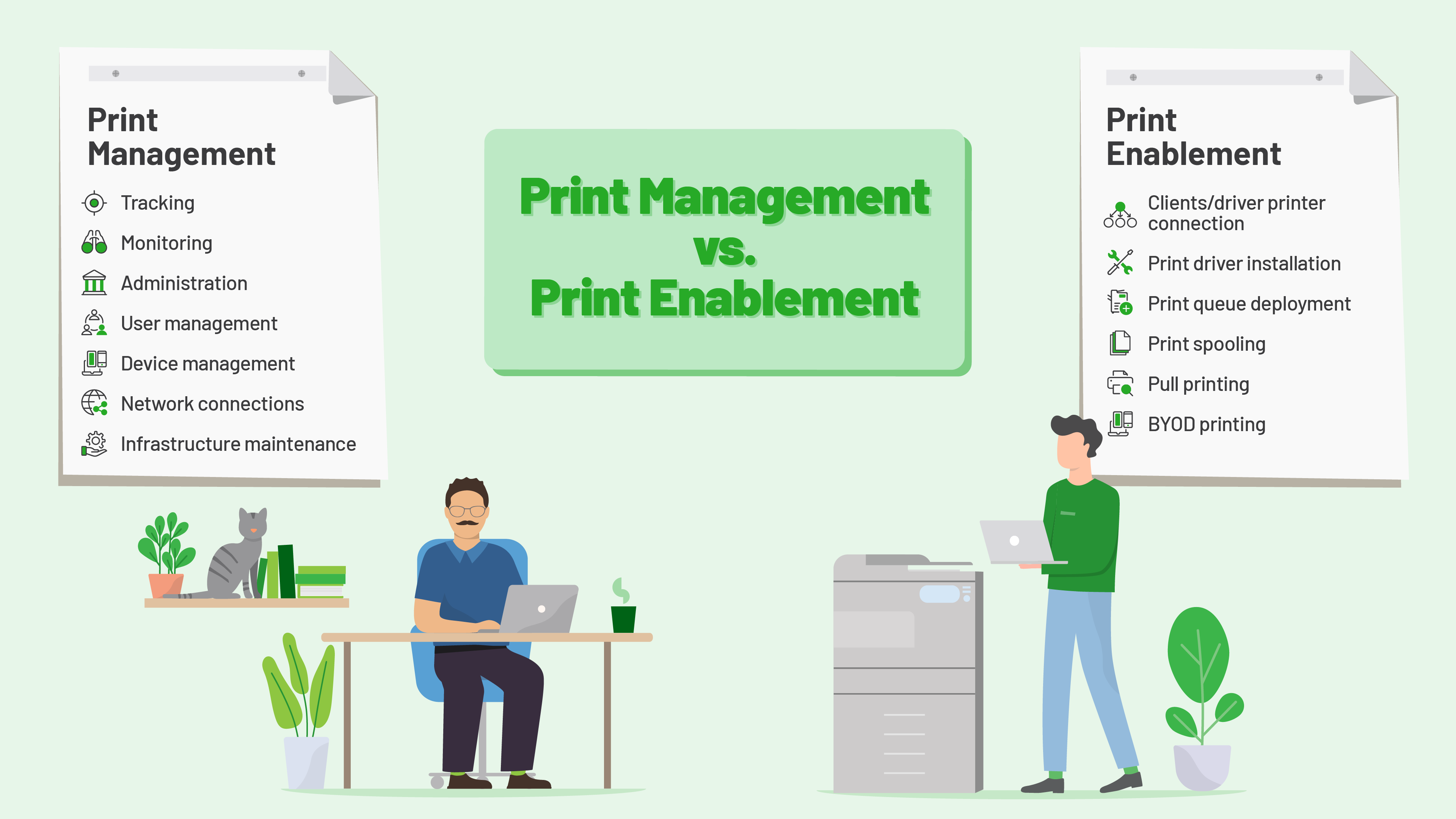
What is the difference between print management and print enablement?
Print management
The backend tracking, monitoring, administration, and management of devices, print devices, users, networks, and IT infrastructure.
Print enablement
Makes printing happen on your device. Deploying drivers and queues to cellphones, tablets, laptops, and desktops.
There is a standalone software for each, and some print management vendors provide both functionalities.
What is the difference between server and serverless print management?
Server print management
Your printing is managed by a print server - another piece of hardware in your infrastructure.
Serverless print management
Your printing is managed in the cloud, either as a self-hosted (single-tenant) or fully-hosted (multi-tenant) SaaS solution.
Traditionally a large number of printers required a print server to keep the printers running. But with the advent of cloud computing, print management began to shift from being run by a server, to running in the cloud.
Whether your business requires a print server or serverless print management depends on your organization’s print environment and requirements.
Print management in different industries
Printing is printing. But the main print management pain points do differ depending on the industry - even if only slightly.
Print management in Enterprise
Large enterprises require reliable and powerful printing that is dependable, scalable, and secure. High Availability measures for maximum uptime and max-out efficiency are a priority for print environments that span hundreds of users and devices.
Enterprise companies also require solutions that are scalable and safeguard their data to industry security and compliance standards.
Print management in SMB’s
Small to medium businesses (SMB’s) have limited resources and time.
SMB-type workplaces require print management solutions that free-up IT admin time, enable efficient document workflows, and reduce costs and waste, all while ensuring users can print simply without taxing IT workloads.
Print management in Education
K-12 schools and large multi-campus universities equip their print environments with print management software to track, control, and recover print spend.
For K-12 schools, seamless printing is needed to enable smartphone, tablet, and Chromebook printing for students, teachers, and staff.
Higher education institutions can recover costs directly with a ‘pay for print’ system, and employ security features to protect sensitive information and safeguard data.
Print management in Healthcare
Patient confidentiality and regulatory compliance are of the utmost importance. Healthcare professionals need to protect sensitive patient information, ensuring their print workflows are compliant with regulatory bodies such as HIPAA.
Healthcare also requires unique IT integrations with EMR systems and fax service providers.
Print management in Legal and law firms
Cost recovery and compliance are key for the legal industry. Law firms use print management software for client-chargeable cost recovery, and to adhere to their profession’s strict confidentiality requirements.
Scanning and copying integrations with legal management software provide law firms with an efficient method of streamlining workflows for matters and case files.
Manage print with industry-leading software
PaperCut has been creating smart printer software for more than 20 years.
In 2021 we were positioned as an industry leader in print management in the IDC MarketScape : ‘Worldwide Print Management Solutions Independent Software 2021 Vendor Assessment’ (Doc #US47348521 , December 2021).
Our print management solutions are translated into 30 languages, and used by 139 million users in 89,000 organizations across 195+ countries.
We adopt a cross-platform, vendor-neutral approach across our products to ensure printing is simple, powerful, and secure no matter what printers, devices, or operating systems your workplace uses.
EXPLORE PRODUCTS