Choose your language

Choose your login

Support

How can we help?

PaperCut's AI-generated content is continually improving, but it may still contain errors. Please verify as needed.

Lightbulb icon
Lightbulb icon

Here’s your answer

Sources:

* PaperCut is constantly working to improve the accuracy and quality of our AI-generated content. However, there may still be errors or inaccuracies, we appreciate your understanding and encourage verification when needed.

Lightbulb icon

Oops!

We currently don’t have an answer for this and our teams are working on resolving the issue. If you still need help,
User reading a resource

Popular resources

Conversation bubbles

Contact us

latest features

What’s new in PaperCut MF 25.0?

PaperCut MF - 25.0

Introducing PaperCut MF 25.0: Smarter workflows for modern teams

We’re excited to announce PaperCut MF version 25.0! This release is focused on helping your team work smarter with intelligent new features designed to streamline your daily document processes. Discover powerful scanning and data capture workflows that save time, reduce manual steps, and boost productivity across your organization.

SCANNING, SUPERCHARGED

Transform scans into actionable data with Advanced Scan Actions

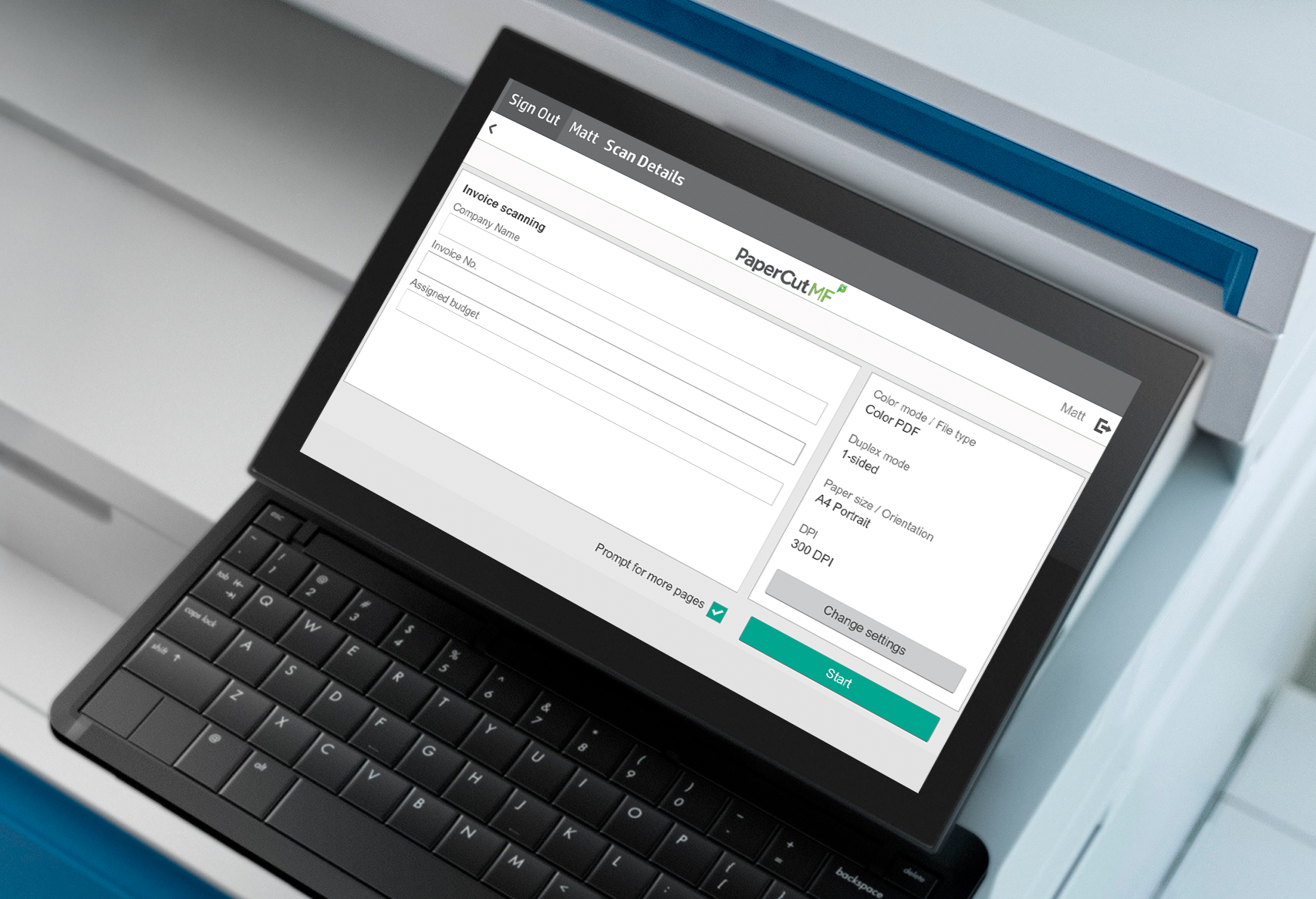
Eliminate cumbersome, manual scanning steps that lead to errors and prevent automation. PaperCut MF's Advanced Scan Actions let you capture crucial metadata right at the MFD, transforming scans into actionable data. This saves time, reduces errors, and allows for seamless integration with business systems like your ERP or CMS.

Document Icon
Capture accurate data, directly at the device
Capture the exact information you need—like invoice numbers or project codes—at the MFD using customizable field types including text, dropdowns, CSV lookups, and finding email addresses from the PaperCut MF user list.
magnifying glass
Automate and streamline critical workflows
Use the metadata captured at the source to power your digital workflows. Automatically name files, route documents to specific cloud folders, or send a scanned invoice directly to the correct department for processing.
Integrate seamlessly with your business systems
Export captured metadata in XML or JSON formats for easy, automated import into your other business systems like an ERP, CMS, or EHR.

UNIFY YOUR INFRASTRUCTURE

Advanced Scan to Fax for Linux

PaperCut MF's Advanced Scan to Fax is now available on Linux. Organizations committed to a Linux infrastructure can now integrate secure, intelligent faxing directly from their MFDs. This streamlines document workflows and eliminates the cost and complexity of maintaining separate servers just for faxing.

Lock and key
Consolidate IT and reduce costs
Standardize your IT environment on your preferred open-source operating system. By running the fully-featured PaperCut MF on your existing Linux servers, you can eliminate the expense and overhead of maintaining dedicated servers for faxing.
cog icon
Enhance security and compliance
Leverage the robust security model of the Linux operating system for not just Scan to Fax, but your entire PaperCut MF deployment.
Gain proven reliability and performance
Depend on a platform renowned for its exceptional stability and high uptime for your mission-critical faxing.

SEAMLESS DEVICE INTEGRATION

Advanced Scan to Fax for Lexmark

PaperCut MF's intelligent Advanced Scan to Fax is now available for Lexmark multifunction devices. This allows organizations using Lexmark to integrate faxing directly into their MFDs, streamlining workflows, enhancing the user experience, and eliminating the need for separate fax machines.

Lock with key
Enhance security and compliance
Leverage secure, API-based connections for transmitting sensitive documents, helping your organization meet compliance requirements like HIPAA or GDPR with an auditable trail of all faxing activity.
reporting Icon
Simplify IT management and reduce costs
Manage all print, scan, and fax activities from a single PaperCut MF interface. Administrators can also leverage zero-touch deployment to effortlessly manage scan actions across the entire Lexmark fleet.
Lock Icon
Streamline workflows and boost productivity
Users can send faxes directly from their familiar Lexmark MFD interface, eliminating extra steps and manual processes.

ENHANCED PERFORMANCE & SECURITY

Improved Stability with SQL Driver Updates

Outdated database drivers can cause performance slowdowns, compatibility issues, and security risks, especially in large environments. We have upgraded the Microsoft SQL driver used by PaperCut MF and redesigned how drivers are managed to improve stability and performance. This gives administrators the visibility and control needed to keep their system secure and running at its best.

Megaphone icon
Proactive visibility and alerts
IT administrators can now see the current driver and database versions directly within the PaperCut MF admin interface. To avoid issues, the system provides proactive alerts when your drivers are out of date and an update is recommended.
Server Icon
Simplified and guided upgrades
While updating the driver remains a manual step to ensure full admin control, the process is now much easier. We provide clear, step-by-step instructions and guidance to walk you through the upgrade.
Magnify Glass icon
Better performance and security
By staying up-to-date with the latest endorsed drivers, you can avoid performance slowdowns tied to outdated components, especially in high-load environments.

Tell me more!

More details can be found in the Release Notes for PaperCut MF 25.0

If you just want to buy PaperCut MF, click here to find out how!

background image

Your next 25.0 move

More information? 25.0 in your hands yesterday? No matter what you’re after, we’ve got you covered.

Fill out the form next door to get the ball rolling.

Illustration of cartoon plants and birds in a colourful garden setting

This site is protected by reCAPTCHA and the Google Privacy Policy and Terms of Service apply.