








Microsoft Windows 2003/2008 offers clustering capabilities through its Microsoft Cluster Server (MSCS)
This section discusses both Mode 1 and Mode 2 configurations in Microsoft Cluster Server. There are separate pages for Veritas Cluster Server and Novell Cluster Services.
This section assumes that you have an already installed and working clustered printing environment.
Mode 1 - Clustering at the Print Provider layer
The PaperCut Print Provider is the component that integrates with the print spooler service and provides information about the print events to the PaperCut Application Server. At a minimum, in a cluster environment, the Print Provider component needs to be included and managed within the cluster group. The Application Server component (the Standard Install option in the installer) is set up on an external server outside the cluster. Each node in the cluster is configured to report back to the single Application Server using XML web services over TCP/IP.
Step 1 - Application Server (primary server) setup
Install the Application Server component (Standard Install option) on your nominated system. This system is responsible for providing PaperCut NG/MF’s web based interface and storing data. In most cases, this system will not host any printers and is dedicated to the roll of hosting the PaperCut Application Server. It can be one of the nodes in the cluster; however, a separate system outside the cluster is generally recommended. An existing domain controller, member server or file server will suffice.
Step 2 - Installing the Print Provider components on each node
The Print Provider component needs to be separately installed on each node involved in the print spooler cluster. This is done by selecting the Secondary Print Server option in the installer. Follow the secondary server set up notes as detailed in Configuring secondary print servers and locally attached printers. Take care to define the correct name or IP address of the nominated Application Server set up in step 1.
Step 3 - Decouple service management from nodes
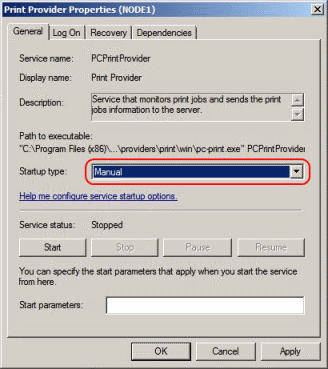
By default, the Print Provider component is installed under the management of the node. To hand over management to the cluster, the service start-up type needs to be set to manual on each node.
- Navigate to Control Panel > Administrative Tools > Services.
- Locate the
PaperCut Print Providerservice. - Stop the service and set the start-up type to Manual.
- Repeat for each node in the cluster.
Step 4 - Adding the Print Provider service as a resource under the print spooler’s cluster group
-
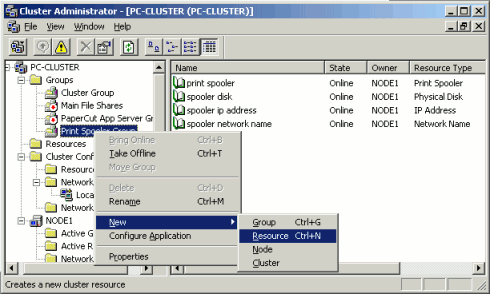
Open the Cluster Administrator.
-
Right-click the cluster group hosting the spooler service; then select New > Resource.
-
In the new resource wizard, enter a name of
PaperCut Print Provider, select a resource type of Generic Service; then click Next. -
Click Next at Possible Owners.
-
Ensure that the
Print Spooler Serviceresource is set as a required dependency, then click Next. -
On the Generic Service Parameters page, enter a service name of
PCPrintProviderand ensure the Use Network Name for computer name check box is selected. Click Next.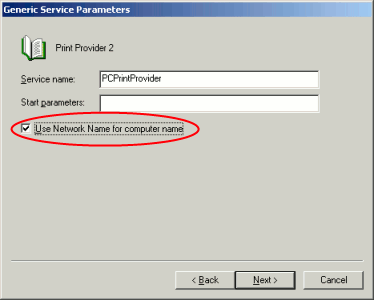
-
Click Finish at the Registry Replication page.
Step 5 - Shared active job spool
To ensure the state of jobs currently active (e.g. held in a hold/release queue) are not lost during a failover event, PaperCut NG/MF is able to save job state in a shared drive/directory. If a shared disk resource is available and can be added to the cluster resource, PaperCut can use this to host a shared spool directory to ensure no active job state is lost.
-
Add a shared drive to the cluster resource. e.g. (Q: drive). It is advisable to use the same drive as used for the shared print spool directory.
-
Create a directory in this drive called
PaperCut\\Spool. -
On each node, edit the file:
[app-path]/providers/print/win/print-provider.confand add a line pointing to the shared active job spool directory:SpoolDir=Q:\\PaperCut\\SpoolChange the drive letter as appropriate.
Step 6 - Bring up all cluster resources and test
Perform operations to verify that:
- Print jobs log as expected.
- There is no error message in the Print Providers text log located at:
C:\Program Files\PaperCut NG/MF\providers\print\win\print-provider.logon each node.
Active/Active clustering - multiple virtual servers
On large networks it is common to distribute load by hosting print spooler services under two or more virtual servers. For example, two virtual servers can each host half of the organization’s printers and share the load. This is sometimes referred to as Active/Active clustering - albeit not an entirely correct term, as the print spooler is still running in Active/Passive.
Virtual servers cannot share the same service on any given node. For this reason if the virtual servers share nodes, manually install the PaperCut Print Provider service a second time under a different name. This can be done with the following command line:
cd \Program Files\PaperCut NG/MF\providers\print\win
pc-print.exe PCPrintProvider2 /install
The argument preceding /install is the unique name to assign to the service. The recommended procedure is to suffix the standard service name with a sequential number. Repeat this on each physical node. Use a unique service name for each “active” virtual server hosted in the cluster group.
Make sure that you have unique SpoolDir settings for each node of your cluster. Ensure that the SpoolDir setting in the print-provider.conf file has a %service-name% expansion variable as explained above. This ensures that each service has it’s own spool directory.
Mode 2 - Clustering at all application layers
Mode 2 implements failover clustering at all of PaperCut NG/MF’s Service Oriented Architecture software layers, including:
- clustering at the Print monitoring layer
- clustering at the Application Server layer
- optional clustering at the database layer.
Mode 2 builds upon Mode 1 by introducing failover (Active/Passive) clustering in the Application Server layer. This involves having an instance of the Application Server on each of the cluster nodes. When one node fails, the other automatically takes over the operation.
Both instances use a shared data source in the form of an external database (see Deployment on an external database (RDBMS)). Large sites should consider using a clustered database such as Microsoft SQL Server.
This section assumes that you have an already installed and working clustered printing environment.
Step 1 - Application Server installation
On one of the cluster’s nodes, install the PaperCut Application Server component by selecting the Standard Install option in the installer. Follow the set up wizard and complete the process of importing all users into the system.
Step 2 - Convert the system over to an external database
The system needs to be configured to use an external database as this database is shared between both instances of the Application Server. Convert the system over to the required external database by following the procedure detailed in Deployment on an external database (RDBMS). The database can be hosted on another system, or inside a cluster. As per the external database setup notes, reference the database server by IP address by entering the appropriate connection string in the server.properties file.
Step 3 - Setup of 2nd node
Repeat steps 1 and 2 on the second cluster node.
Step 4 - Distribute application subscription or license
If you’re using PaperCut NG/MF version 23.x or earlier:
- Install your license file on each node in your cluster. See Installing a license for more information.
If you’re using PaperCut NG/MF version 24.x or later:
- If you’re a subscription customer:
- Activate your subscription (Activating/renewing a subscription) on the currently active node.
- Copy the
server.uuidfile from[app server install]\server\server.uuidto the same location on the other passive node(s).
- If you’re a perpetual customer:
- Install your license (Installing a license) on the currently active node.
- Copy the
server.uuidfile from[app server install]\server\server.uuidto the same location on the other passive node(s).
Step 5 - Decouple service management from the nodes
By default the PaperCut Application Server component is installed under the management of the node. It needs to be managed inside the cluster, so set the service’s start-up type to manual. On each node navigate to Control Panel > Administrative Tools > Services locate the PaperCut Application Server. Stop the service and set its start-up type to Manual. Repeat this on each node.
Step 6 - Create a new cluster group
Designate the PaperCut Application Server to run inside its own cluster group. Create a new cluster group containing the each of the nodes. Add an IP Resource and a Network Name resource. Give the network name resource an appropriate title such as PCAppSrv.
The need for a new cluster group is not required. It is, however, recommended as it gives the most flexibility in terms of load balancing and minimizes the potential for conflicts.
Step 7 - Adding the PaperCut Application Service as a resource managed under the new cluster group.
- Open the Cluster Administrator.
- Right-click the cluster group hosting the spooler service; then select New > Resource.
- In the new resource wizard, enter a name of
PaperCut Application Server, select a resource type of Generic Service, then click Next. - Click Next at Possible Owners page.
- Click Next at Dependency page.
- On the Generic Service Parameters page, enter a service name of
PCAppServer, ensure the Use Network Name for computer name option is checked; then click Next. - Click Finish at the Registry Replication page.
Step 8 - Bring the cluster group online
Right-click the cluster group; then select Bring online. Wait until the Application Server has started, then verify that you can access the system by pointing a web browser to :
http://[Virtual Server Name]:9191/admin
Log in, and perform some tasks such as basic user management and User/Group Synchronization to verify the system works as expected.
Step 9 - Set up the Print Provider layer
Interface the PaperCut Print Provider layer with the clustered spooler service by following the same setup notes as described for Mode 1. The exception being that the IP address of the Application Server is the IP address assigned to the Virtual Server assigned in step 6.
Step 10 - Client configuration
The client and Release Station programs are located in the directories:
[app-path]/client/[app-path]/release/
These directories contain configuration files that instruct the client to the whereabouts of the server. Update the IP address and the server name in the following set of files to the Virtual Server’s details (Name and IP address):
[app-path]/client/win/config.properties[app-path]/client/linux/config.properties[app-path]/client/mac/PCClient.app/Contents/Resources/config.properties[app-path]/release/connection.properties
Edit the files using Notepad or equivalent and repeat this for each node. Also see PaperCut User Client configuration.
Step 11 - Test
Mode 2 setup is about as complex as it gets! Take some time to verify all is working and that PaperCut NG/MF is tracking printing on all printers and all virtual servers.
Advanced: Load distribution and independent groups
You can split the two application layers (Resources) into two separate Cluster Groups:
- Group 1: Containing only the
PaperCut Application Serverservice. - Group 2: Containing the
PaperCut Print ProviderandPrint Spoolerservices. These services are dependent and must be hosted in the same group.
Separating these resources into to groups allows you to set up different node affinities so the two groups usually run on separate physical nodes during normal operation. The advantage is that the load is spread further across the systems and a failure in one group will not necessarily fail-over the other.
To make this change after setting up the single group Mode 2 configuration:
- Change the
ApplicationServer=option in[app-path]/providers/print/win/print-provider.confon each physical node to the IP or DNS name of the virtual server. - Create a new group called
PaperCut Application Server Group. - Set the Preferred owners of each group to different physical nodes.
- Restart or bring on line each group, and independently test operation and operation after fail-over.
Clustering tips
-
Take some time to simulate node failure. Monitoring can stop for a few seconds while the passive server takes over the role. Simulating node failure is the best way to ensure both sides of the Active/Passive setup is configured correctly.
-
It is important that the version of PaperCut running on each node is identical. Ensure that any version updates are applied to all nodes so versions are kept in sync.
-
The PaperCut installation sets up a read-only share exposing client software to network users. If your organization is using the zero-install deployment method, the files in this share are accessed each time a user logs onto the network. Your network might benefit from exposing the contents of this share via a clustered file share resource.
-
PaperCut regularly saves transient state information (such as print job account selections) to disk so that this state can be recovered on server restart. If failing over to a new cluster server, you should ensure this state information is saved to a location available to the new server.
By default the state information is located in
[app-path]/server/data/internal/state/systemstate. You can change this location if required by setting the propertyserver.internal-state-pathin your server.properties file.
Additional configuration to support Web Print
By default the Application Server looks in [app-path]\server\data\web-print-hot-folder for Web Print files. This location is generally only available on one node in the cluster. To support Web Print in a cluster, add a Shared Folder on the Shared Storage in your cluster. This can be done on the same disk that the spool files reside and the Print Provider points to.
To change this location, use the Config Editor and modify the web-print.hot-folder key.
-
Add a Shared Folder on the Shared Storage, an example would be
E:\web-print-hot-folderand share it as\\clustername\web-print-hot-folder\. -
Click the Options tab. The General age is displayed.
-
In the Actions menu, click Config editor (advanced).
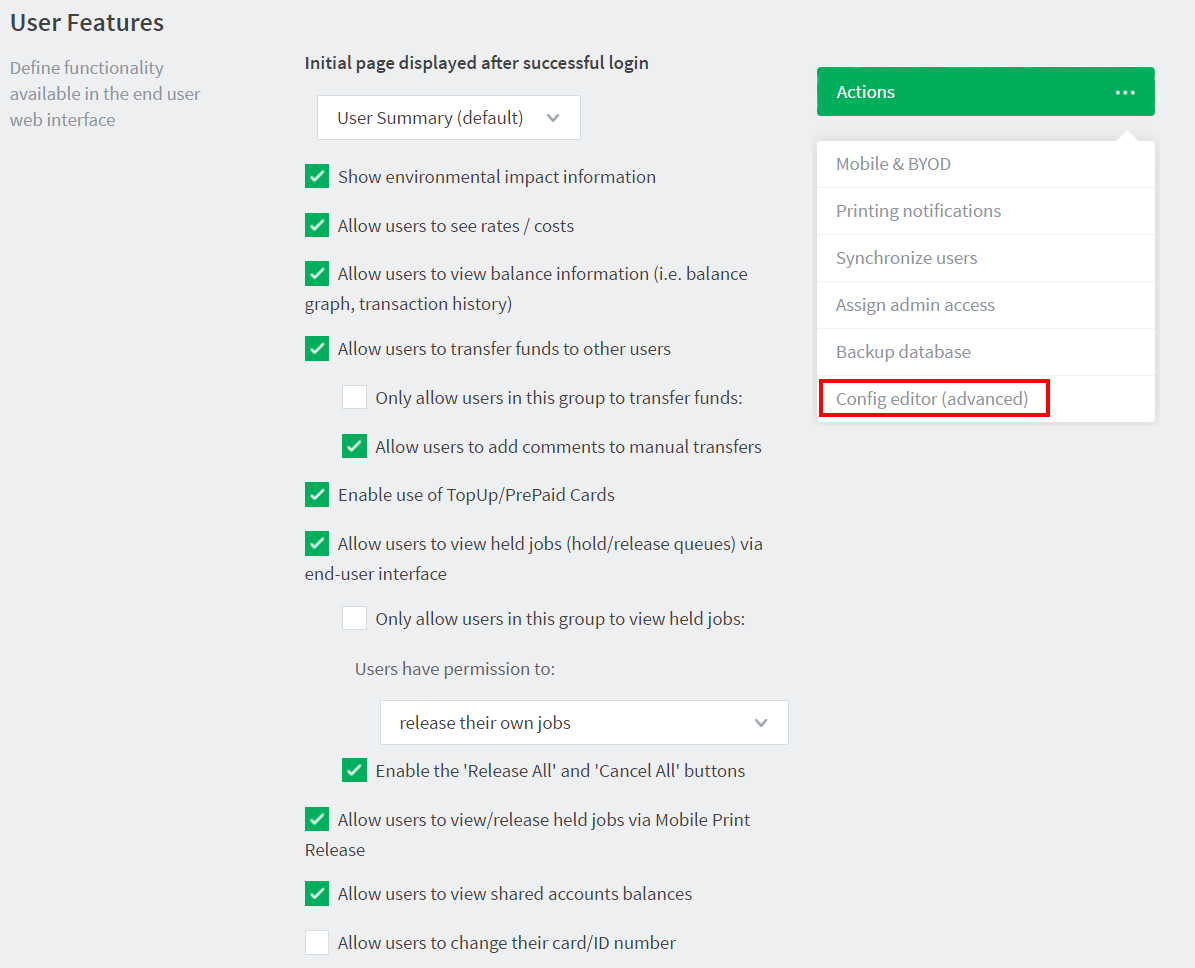
The Config Editor page is displayed.
-
Modify
web-print.hot-foldertoE:\web-print-hot-folder -
Map your selected network drive on the Web Print Sandbox machine to
\\clustername\web-print-hot-folder\ -
Add all relevant printer queues from
\\clusternameto the Web Print Sandbox server.
Additional configuration to support Print Archiving
If you have enabled Print Archiving (viewing and content capture), the Applications Server stores archived print jobs in [app-path]\server\data\archive. This location is generally available only on one node in the cluster. To support Print Archiving in a cluster, add a Shared Folder on the Shared Storage in your cluster. This location must be accessible to all cluster nodes and also any print servers that are collecting print archives.
For instructions for moving the archive location see Phase 1: Moving the central archive:. This describes how to configure both the Application Server and your print servers to use the same shared storage location.
Comments