








This section explains how to manage the Printer List in the PaperCut NG/MF Application Server in the Printers section. The instructions below outline the steps for adding, configuring, and removing these tracked print queues that the Application Server monitors for print management.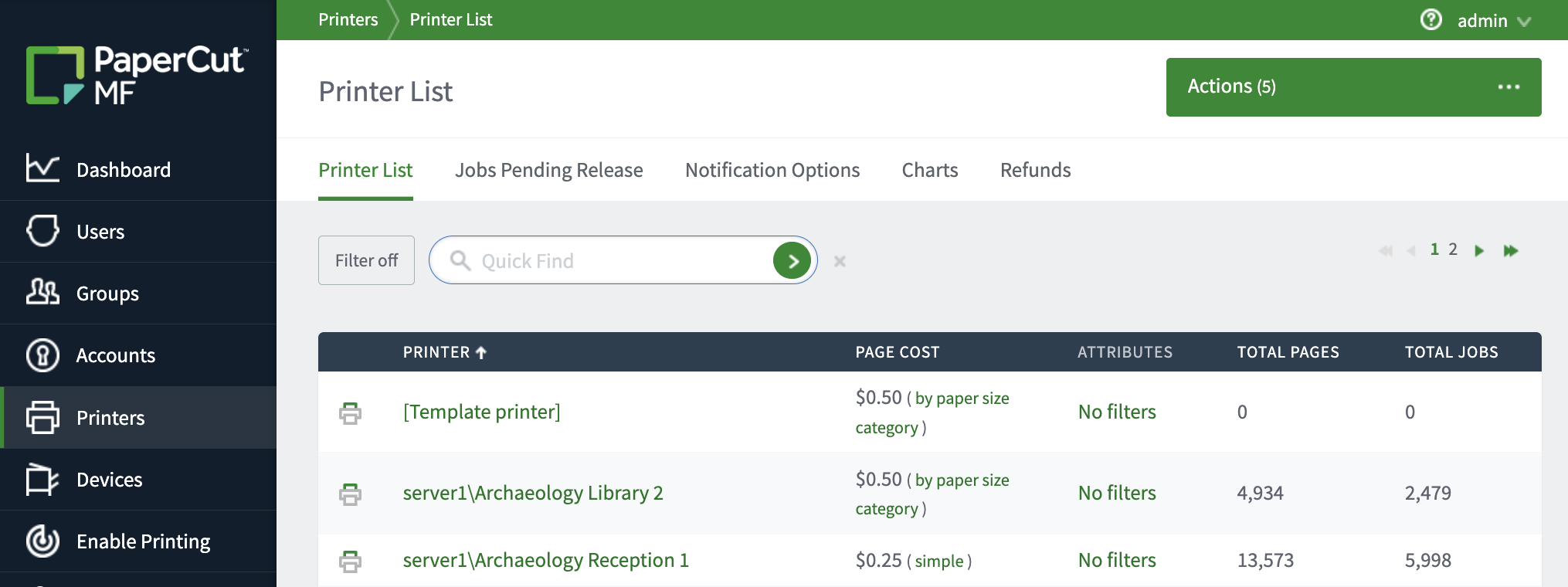
Adding a printer
This describes the process of adding your printer (your print queue) to PaperCut NG/MF (i.e. making the print queue visible in the PaperCut admin interface, under the Printers tab).
To be able to add the printer to PaperCut NG/MF, you will need to have already created the print queue on your local system (e.g. added the printer to your Windows system, or macOS system - as you would do normally).
Windows
PaperCut NG/MF tracks all print queues local to the system by default. Local print queues are those that have been set up on the server running PaperCut NG/MF with a local port, such as: a TCP/IP connection to a network printer, an LPR connection, or a printer attached locally via USB or LPT. Standard Windows print queues that are hosted on a different system, or re-shared, are not tracked (you can track these queues by setting up a secondary print server, see Configuring secondary print servers and locally attached printers).
New print queues added to the system (at the OS level) should then show up automatically in the PaperCut NG/MF admin interface, under the Printers tab. However, in some rare situations the printer shows up only after the first print job is sent.
macOS
Since PaperCut NG/MF version 18.3.3, all macOS printers are automatically added to the Printers tab. When you add printers to your print server (e.g. through System Settings > Printers and Scanners) after installation, they are also automatically added to PaperCut NG/MF.
Print queues hosted on a different system to your PaperCut NG/MF Application Server will need a secondary print server / print provider set up on that other system - see Configuring secondary print servers and locally attached printers.
If you have disabled the printer auto-import feature, you will need to manually add the required printer. For more details, see below:
To manually add a printer
-
Open Finder on macOS, and navigate to Applications > PaperCut MF (or PaperCut NG).
-
Double-click on the Control Printer Monitoring.command shortcut.
… or if you prefer, use Terminal, navigate to:cd [app_directory]e.g.cd /Applications/PaperCut\ MF/Then run the Control Printer Monitoring command:
./Control\ Printer\ Monitoring.command -
Enter your macOS admin password if required.
-
If the auto-import feature is still enabled, the command will ask if you want to disable it. Type
yesand hit enter, to disable the Auto Import feature. -
Re-run the command from above (or double click the shortcut again).
./Control\ Printer\ Monitoring.command -
Use
efor enable,dfor disable orlfor leave (don’t do anything) to enable or disable printers in PaperCut NG/MF, found on your system. Note that if you don’t see the printer(s) that you’re expecting - make sure that they have been added through System Settings > Printers and Scanners - or directly through CUPS.
To enable (or disable) the printer auto-import feature
- On the macOS server hosting the queue to be added, in a text editor, open the file:
[app-path]/providers/print/mac/print-provider.conf. - Locate the line
EnablePrinterAutoImport=off. - Change
offtoonto enable the auto import feature (or changeontooffif you are wanting to disable the auto import feature). - Save the file.
- Restart the PaperCut Print Provider service (or restart the system if you prefer).
(macOS) Video walkthrough, manually setting up printers on macOS
For a more detailed look at setting up printers on macOS, and installing PaperCut NG/MF on macOS in general, we also have a walk-through video discussing the process here.
Note that this video was done a while ago, and covers macOS 10.12 (Sierra) through macOS 10.15 (Catalina). More recent versions are extremely similar but have slight changes to naming of System Preferences / System Settings etc.
(macOS) Alternative detailed manual steps to perform the above (legacy)
-
Stop new printers from being automatically added to PaperCut NG/MF:
- On the computer system hosting the queue to be added/removed/ignored, In a text editor such as Notepad, open the file:
[app_dir]\providers\print\mac\print-provider.conf. - Locate the line
EnablePrinterAutoImport=on. - Change
ontooff. - Save the file.
- Restart the Print Provider service. The service is called
papercut-event-monitoron both Mac and Linux machines. For more information, see Stopping and starting PaperCut Services (Print Provider).
- On the computer system hosting the queue to be added/removed/ignored, In a text editor such as Notepad, open the file:
-
On the print server, open a terminal.
-
Navigate to:
cd [app_directory]/providers/print/mac -
Type the following command:
sudo ./configure-cups --list
A list of all printers connected to the server is displayed. -
To add a printer, type the following command:
sudo ./configure-cups --addThe printer is now added to the server.
-
Type the following commands:
cd ~/providers/print/mac
sudo ./configure-cups --help
The options available in this tool are displayed.
-
Test the changes by printing to the printer.
Linux
PaperCut NG/MF tracks printing by integrating with the Common UNIX Printing System (CUPS), the printing system on Linux. For a printer to be tracked, CUPS needs to be told to route print jobs through PaperCut NG/MF before printing.
To do this, the printers.conf file must be edited. This can either be done manually, or assisted via the configure-cups script.
Set up printers using a script
-
On the print server, open a terminal.
-
Type the following commands:
cd  ~/providers/print/linux-*
sudo ./configure-cups –help
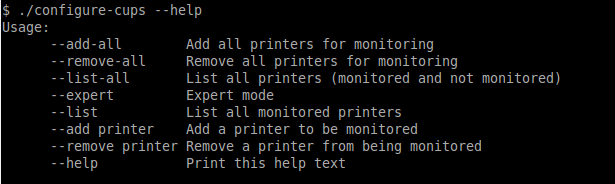
The options available in this tool are displayed.
-
To monitor all printers on your network, type:
--add-all -
To monitor a subset of printers in your network:
- Type
--list-all. A list of all printers on your network is displayed. - For each printer you want to add, type
--add <printer name>
- Type
To use the script, run the script file at [app-path]/providers/print/linux-*/configure-cups. Read the script’s instructions carefully to enable monitoring on the desired printers.
Set up printers manually
-
Open your
printers.confin a text editor such asvim. On most Linux distributionsprinters.confis located at/etc/cups/printers.conf. -
Prepend
papercut:to theDeviceURIof the printers you want to track. After the modification aDeviceURIline might look like:DeviceURI papercut:ipp://1.2.3.4/printers/My_Printer -
Restart CUPS in the way appropriate to your distribution. E.g.:
/etc/init.d/cupsys restart -
Perform a test print on each printer. This causes the printers to be registered. This step is not required with the
configure-cupsscript, because the script registers the printers automatically. -
The printers should now be registered. Log in to PaperCut NG/MF as
adminand verify that the printers are now listed on the Printer List page. Verify that the test prints sent previously were tracked correctly.
Ignoring a printer
This describes the process of configuring PaperCut NG/MF to ignore a printer (a print queue) so that print jobs going through that queue are completely ignored by the PaperCut Print Provider.
An ignored printer will not show up in the Printers list in PaperCut NG/MF, unless it was added to the list before it was ignored. If an ignored printer is showing up in the list of printers, the ignored printer can be deleted (see Deleting / removing a printer), and will then not be re-added to the printers list.
Windows
The Print Provider component is responsible for locating and tracking the printers. To instruct it to ignore a printer:
-
On the computer system hosting the queue to be added/removed/ignored, open the file
[app_dir]\providers\print\win\print-provider.confin a text editor such as Notepad. -
Locate the line
IgnorePrinters=and enter the full name of the printer on the right-hand-side of the equals line. For example:IgnorePrinters=Office PrinterIf you have multiple printers to ignore, then separate the each printer name with a comma. For example:
IgnorePrinters=Office Printer,Copy Room PrinterWildcard expressions can also be used. Use ‘*’ to ignore any span of characters, and ‘?’ to ignore a single character. For example, to ignore any printers that start with the phrase Copy Room:
IgnorePrinters=Copy Room -
Restart (stop then start) the
PaperCut Print Providercomponent under Start > Control Panel > Administrative Tools > Services -
In the Admin interface, delete the printer from PaperCut NG/MF:
- Click Printers; then click the name of the device you want to delete.
- In the Actions menu, click Delete this device.
- Click OK.
-
Test the changes by printing to the deleted printer and ensuring the printer does not re-register itself in the system. It if does, verify the name assigned under the
IgnorePrinters=setting is correct.
macOS
-
Open Finder on macOS, and navigate to Applications > PaperCut MF (or PaperCut NG).
-
Double-click on the Control Printer Monitoring.command shortcut.
… or if you prefer, use Terminal, navigate to:cd [app_directory]e.g.cd /Applications/PaperCut\ MF/Then run the Control Printer Monitoring command:
./Control\ Printer\ Monitoring.command -
Enter your macOS admin password if required.
-
If the auto-import feature is still enabled, the command will ask if you want to disable it. Type
yesand hit enter, to disable the Auto Import feature. -
Re-run the command from above (or double click the shortcut again).
./Control\ Printer\ Monitoring.command -
Enter
dfor disable orlfor leave (don’t do anything) to disable (or leave alone) printers in PaperCut NG/MF, found on your system.
Linux
-
Stop new printers from being automatically added to PaperCut NG/MF:
-
On the computer system hosting the queue to be added/removed/ignored, In a text editor such as Notepad, open the file:
[app_dir]\providers\print\mac\print-provider.conf -
Locate the line
EnablePrinterAutoImport=on. -
Change
ontooff. -
Save the file.
-
Restart the secondary server. The service is called
papercut-event-monitoron both Mac and Linux machines. For more information, see How to Enable Debug in the Print Provider.
-
-
On the print server, open a Linux Shell Command Terminal.
-
Navigate to:
cd [app_directory]/providers/print/linux-* -
Type the following command:
sudo /ng-mf/configure-cups --listA list of all printers connected to the server is displayed.
-
To delete a printer, type the following command:
sudo /ng-mf/configure-cups --remove <printer name>The printer is now ignored.
Deleting / removing a printer
This describes the process of deleting or removing a printer from the PaperCut NG/MF admin interface (under the Printers list).
If a deleted printer is still being monitored by the PaperCut Print Provider, then the next time a print job is sent through that print queue, the printer will re-appear under the Printers list. If you want to stop the printer from being re-added to the list, you’ll need to make sure the printer has been ignored - see the Ignoring a printer section above.
If you have questions about the historical reporting of data when thinking about deleting a printer, see What happens to the historical data of a user/printer when they are deleted?
Windows/macOS/Linux:
In the PaperCut NG/MF admin interface, delete the printer from PaperCut NG/MF:
- Click the Printers tab.
The Printer List page is displayed. - Select a printer.
The Printer Details page is displayed showing the Summary tab contents. - In the Actions menu, click Delete this printer.
- Test the changes by printing to the deleted printer and ensuring the printer does not re-appear under the Printers tab. It if does, verify that it is not being monitored by following the Ignoring a printer section above.
What’s the difference between ignoring and deleting printers?
- Deleting a printer - removes the printer entirely from the Printers list in PaperCut NG/MF. The printer might reappear in the list, if it is tracked by PaperCut on a print server running the PaperCut Secondary Server or a workstation running the Direct Print Monitor.
- Ignoring a printer - configures PaperCut not to track the printer at all. The printer might stay in the Printers list in PaperCut until deleted. Print jobs going through a print queue which has been ignored, will not be tracked by the PaperCut Print Provider.
Is there a way to delete printers in bulk from PaperCut?
Yes! Have a look at our article Batch Deleting Printers.
Why would I want to ignore a printer?
Common reasons for ignoring a printer include:
- You need to test printing with PaperCut disabled for troubleshooting purposes.
- The printer is a virtual printer such as a FAX or PDF converter.
- You are not concerned with tracking usage on the printer.
- The printer is only used by trusted people and it’s usage can be disregarded from reports.
- The printer is used for a special purpose such as label or batch printing and tracking is not appropriate or causes problems.
- Management has made a determination that print recording should not occur on a particular device (e.g. printing of sensitive material/documents).
Virtual Fax and PDF Printers
By default, PaperCut NG/MF on Windows ignores virtual printers such as virtual fax drivers and PDF or XPS writers. Common examples include Microsoft Print to PDF, Microsoft XPS Document Writer, and Microsoft Shared Fax Driver, as well as other brands.
These queues don’t print on real paper. Ignoring them helps keep reports accurate and user quotas fair.
If you need to track jobs to these queues, you can turn this feature off.
To monitor virtual printers
- On the Windows PaperCut server, open
[app-path]/providers/print/win/print-provider.conf. On a 64-bit PaperCut MF server on Windows this path would beC:\Program Files\PaperCut MF\providers\print\win\print-provider.conf. - Find the line
#ignorevirtualprinters=On. Uncomment the line and toggle the setting by updating this line toignorevirtualprinters=Off. - Restart the PaperCut Print Provider service to apply the change.
Other command line options for macOS and Linux
There are other command line options available for the configure-cups command. These can be found by using the --help flag as below:
-
Open a Linux Shell Command Terminal.
-
Navigate to:
cd [app_directory]/providers/print/linux-* -
Run the following command:
/ng-mf/configure-cups --help -
All the other command line options available are listed.
Comments