- Overview
- How does PaperCut integrate with Active Directory?
- What does PaperCut use to sync, when synchronizing with AD?
- Does PaperCut support multiple domains?
- I have a “locked down” Active Directory environment and PaperCut is having problems accessing the AD. How can I fix this?
- My users in AD do not list under one of my groups. What is the problem?
- What are the limitations with Active Directory Primary Groups?
- Is there Nested Group Support with a Linux or Mac Application server?
- If I manually update a card number in PaperCut, and the card number in AD is blank, will my manually updated number get overwritten at the next sync?
- Still have questions?
PaperCut and Active Directory
THE PAGE APPLIES TO:




Contents
- Overview
- How does PaperCut integrate with Active Directory?
- What does PaperCut use to sync, when synchronizing with AD?
- Does PaperCut support multiple domains?
- I have a “locked down” Active Directory environment and PaperCut is having problems accessing the AD. How can I fix this?
- My users in AD do not list under one of my groups. What is the problem?
- What are the limitations with Active Directory Primary Groups?
- Is there Nested Group Support with a Linux or Mac Application server?
- If I manually update a card number in PaperCut, and the card number in AD is blank, will my manually updated number get overwritten at the next sync?
- Still have questions?
All PaperCut products released after 2004 include full native support for Active Directory including support for Nested groups, and Organizational Units. PaperCut still continues to support older NT style domains too.
Here are some common AD questions:
How does PaperCut integrate with Active Directory?
PaperCut accesses Active Directory in a read-only way for user authentication and extracting user account metadata such as email address, full name, office, department and group membership. Write access or elevated rights access is not required. When running on a Windows Server PaperCut uses native Active Directory APIs. When running on a Linux or Mac system PaperCut accesses AD via the remote LDAP interface.
PaperCut will never cache user rights credentials (e.g. passwords). In line with security best practice, user authentication is done via real-time interrogation at the moment of authentication. User account metadata (e.g. Full Name) is cached locally to minimize load on the AD server and only queried during:
- Initial account creation
- During overnight sync if enabled
- During a manual user/group sync
For a more detailed look at how PaperCut integrates with AD, check out the Troubleshooting AD Authentication article.
What does PaperCut use to sync, when synchronizing with AD?
PaperCut uses the username of the user - technically the sAMAccountName to sync users from AD - not the UPN, or GUID. What this means is that if you rename a user from ‘alex’ to ‘alex1’ in AD, Papercut will add that user (alex1) as a new user. (See How to rename user accounts in PaperCut if that’s an issue you’re facing). This does also mean that if you change UPNs for the users in AD, there won’t be any impact to the AD sync.
However, if you are interested in sync’ing with UPN instead, we do now have a feature in version 19.2 which allows Syncing using UPN instead of username.
Does PaperCut support multiple domains?
Yes, PaperCut supports synchronizing users from multiple domains and is commonly used in complex tree/forest arrangements. Note that if you have multiple domains containing users that have duplicate usernames, take a look at our Syncing using UPN instead of username feature (In 19.2 PaperCut NG/MF sync usernames across multiple active directory domains using the User Principal Name (UPN), avoiding username clashing).
I have a “locked down” Active Directory environment and PaperCut is having problems accessing the AD. How can I fix this?
By default, PaperCut runs as the Local System account. This is generally regarded as best practice for services. The Local System account should have access to query the AD (read-only access) in most default domain environments. If however the server is not a member of the domain (maybe in another domain), or the AD environment has been locked down from defaults, then some further configuration may be required.
Please see Run PaperCut Services with a Domain User Account for information on how to configure the Application Server service with a domain user account.
My users in AD do not list under one of my groups. What is the problem?
This may be caused by the use of the legacy primary group field in AD. The problem is discussed in detail below.
What are the limitations with Active Directory Primary Groups?
In an Active Directory domain, all users have a “Primary Group”, which is only used for legacy reasons and for POSIX compliance. By default, the primary group of all Active Directory users is set to the built-in “Domain Users” group. It is recommended that you leave “Domain Users” as the primary group (Best practice suggested by Microsoft) and use standard groups for management.
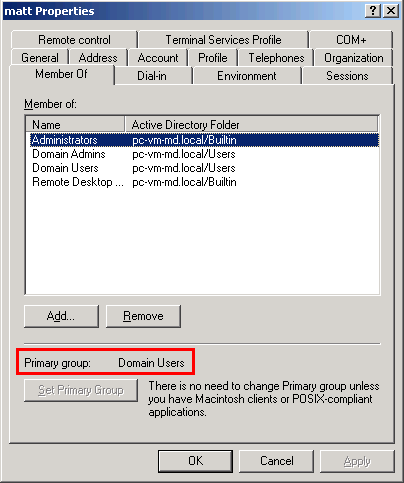
Due to a limitation in Active Directory, when a user is a member of a group by virtue of it being the user’s primary group, they are not reported as a member of that group when using the Active Directory APIs.
For example, if a user’s primary group is set to a group called “Staff”, then the user will not appear to be a member of “Staff” when using selected Active Directory APIs.
This behavior can adversely affect PaperCut’s group-based features (like quota allocation, or new user creation rules) because the user is not correctly reported as being a member of the group.
For this reason, it is highly recommended to leave “Domain Users” as the primary group for all users of your domain.
Work around:
If you need to use a group in PaperCut that is also used as a primary group, where users are a member of a group by virtue of it being their primary group, then the work around is to create a mirror group.
For example, if you have a group called “Staff” and are unable to use this group because of the primary group problem, create a new group called StaffStandard and add staff members to this group. You can take advantage of Active Directories query system to quick identify and add the staff users. The new group StaffStandard can then accurately be used in PaperCut.
Is there Nested Group Support with a Linux or Mac Application server?
Due to limitations in the various LDAP protocol implementations, Nested Group functionality is not available if you are not using “Windows Active Directory” as a sync source. You will need to use a “Flat Group” instead. We recommend taking this into consideration when opting to use Linux or Mac OS X.
If I manually update a card number in PaperCut, and the card number in AD is blank, will my manually updated number get overwritten at the next sync?
No - if you’re sync’ing with e.g. Active Directory, and you manually update a user’s primary card number to 23456 (through the PaperCut admin interface), and that user’s card number is blank in AD, the next time the sync runs it will not overwrite this value. The primary card number 23456 will remain. Fields in AD will only sync if they are populated with a value. The same holds true for e.g. office, department, pager fields.
Still have questions?
Check out our troubleshooting KB articles to see if these help:
Categories: FAQ , User Management
Last updated March 15, 2024
Comments