



There are many reasons why it can be useful to enable aliases for usernames. Check out our Enable username aliasing article which discusses why you might want to use aliases - and how to enable them in the admin interface.
Enabling aliases is half the story - and this article discusses the other half - how to update or add aliases for usernames in bulk, or automatically through a sync process.
Summary of alias adding/updating methods
There are five different options available for adding or updating aliases:
| Method | Number of aliases supported | More information |
|---|---|---|
| Automatically sync via AD/LDAP1 | One additional alias per user | Option 1 below |
| Update and read aliases via the web services API or server-command utility |
One additional alias per user | Option 2 below |
| Set up aliases using a text file2 | Multiple aliases per user | Option 3 below |
| Bulk update aliases with a .tsv file3 | One additional alias per user | Option 4 below |
| Manually update an alias for one or two users through the admin interface |
One additional alias per user | Option 5 below |
1 The sync sources which support the syncing of aliases include Windows Active Directory, LDAP, Azure AD (since version 22.0.9) and Azure AD Secure LDAP.
2 For this method, the alias will not be visible under Users > [select user] > Details > Username alias, even if Username aliasing is enabled - since the aliases are defined and read directly from the text file.
3 Note that this method only allows aliases to be added/updated for Standard users - not Internal users. Want to know more? Take a look through our Batch user import/update examples article for a comparison between Standard and Internal users.
Option 1: Sync aliases using AD/LDAP
To set up the automatic sync of aliases using AD/LDAP, you will need to enable Username aliasing via the admin interface: Options > Advanced > Username aliasing.
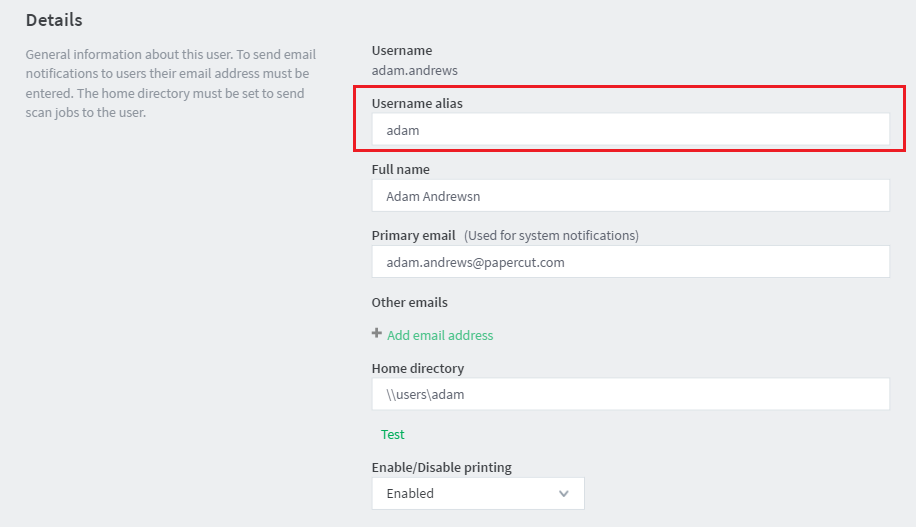
Once Username Aliasing has been enabled, you will see a new text field on the User Details page (Users > [select user] > Details > Username alias).
This information can be automatically imported from Active Directory or LDAP during the overnight sync. Once Username Aliasing is enabled, an option to enter an AD/LDAP field name appears under Options > User/Group sync. Any valid Active Directory or LDAP user field can be chosen to import this information e.g. employeeNumber, employeeID, otherLoginWorkstations.
Once this has been set, information from the Active Directory or LDAP field will be imported every night as username aliases. For more information on user group synchronization see the section User and Group Synchronization .
The video below demonstrates setting up username aliasing:
Option 2: Update aliases using web services API or the server-command utility
The
XML Web Services API
allows you to update the username-alias property using the setUserProperties() and setUserProperty() methods, or you can use the
server command
set-user-property subcommand when using the server-command utility.
You can also obtain the value of the user alias using the corresponding get methods or subcommand.
Option 3: Define aliases in a text file
The other methods on this page allow a user to have a single alias. If users have multiple aliases (or the other methods here don’t work for you) then use the text file option.
Note that users can have an alias created by the methods described above and additional aliases defined in the text file described here.
Define your aliases, and define which username they should link to, in the file: [app-path]\server\data\conf\username-aliases.txt.
Example
John O’Hare (username “john_o_hare”) can have username aliases of “johnohare”, and “johare”. The aliases information is kept in a file:
[app-path]\server\data\conf\username-aliases.txt
and can be created based on the provided template file,
[app-path]\server\data\conf\username-aliases.txt.tmpl
For example on Windows:
- Go to the directory of C:\Programs\PaperCut NG\server\data\conf
- Run Notepad or your favorite text editor on the file username-aliases.txt.tmpl
- Add the following lines to the end:
johno'hare: john_o_hare
johare: john_o_hare - Save file as username-aliases.txt
The format of the alias file is alias first, username second:
aliasname1: username1
aliasnameA: username2
aliasnameB: username2
A username may have multiple aliases (so you may have multiple lines which define different aliases for the same username). In this example, username2 is known both as aliasenameA and aliasnameB. The separator between aliasname and username can be “:”, “=“ or tab.
Note that it is important to make sure that all the alias names are unique, and don’t clash with the usernames or any alias names created by the previous methods.
Option 4: Bulk update aliases with a tsv file
If you have an environment where you won’t need to make a lot of changes to aliases, but you’d have to a lot of initial work to define them, another option is to update (or create) your user aliases using the Batch import and update method . This involves creating a tsv (tab separated values - like a csv but with tabs instead of commas) file and then importing that into PaperCut to update all your users at once.
Option 5: Manually update aliases
If you only need to add an alias for a user for testing, or maybe only add aliases to a handful of users for some very specific circumstances, you can always just manually update the alias in the interface.
Once you’ve Enabled username aliasing , you will then see the Username alias field in the admin interface, under Users > [select user] > Details > Username alias. Enter whatever alias you need, hit apply and you’re done!
At what level is the alias applied?
The username aliases are applied at the following levels:
- User login to the web interface, client popup authentication, or release station login.
- Print jobs arriving in the print queues under the alias name.
What happens if the username does not exist in the list of aliases?
If a username does not match in the list of aliases it’s assumed the user is a standard username. If the user is new to the entire system it will be managed like any other new user account and may automatically be created in PaperCut (depending on your on demand user creation settings ), and then given permissions/credits as per your new user rules defined under the groups section. For this reason, you should take care to ensure your alias list is current and up-to-date.
Comments