



This section describes the PaperCut NG/MF standard upgrade procedure. PaperCut NG/MF supports upgrades using a simple install-over-the-top procedure. Review all steps prior to commencing the upgrade.
A PaperCut NG/MF system might comprise many software components, such as secondary servers, locally installed User Clients or Release Stations. It is generally not required to upgrade these components along with an Application Server upgrade. However, we do recommend that you upgrade all components as best practice.
By contrast, all Site Servers must be upgraded at the same time as your Application Server.
- Before you begin
- Downloading the software
- Application Server Upgrade
- Site Server upgrade
- Additional component upgrades note that these do not need to be upgraded at the exact same time as the Application Server to continue functioning:
- Upgrade Process (Video walkthrough)
- Troubleshooting upgrade problems
- Frequently asked questions (FAQs)
Before you begin
If you’re using PaperCut MF: please contact your PaperCut support partner (located on the ‘About’ tab in the PaperCut administration console, under the ‘Support’ section) to let them know about the upgrade so that they can assist with licensing, device and other upgrade advice - and can also then be available in the unusual event that something goes wrong.
In either case - make sure you’ve taken a look at the following resources:
- Review the Upgrade Policy to ensure you’re able to upgrade with your current license - see “Can I upgrade to the latest version of PaperCut MF/NG with my current license?”
- Review any Known Issues which may impact your environment.
- Review the Release notes for releases between your current version and your planned version (see the PaperCut MF release history and PaperCut NG release history pages)
- Other useful information can be found in our System Requirements pages and Support End-of-life Policy .
Downloading the software
-
PaperCut NG - If you are using a licensed version of PaperCut NG, you can download the latest version here . Before upgrading, it’s worth making sure that your license allows you to upgrade, by checking out the Upgrade Policy .
-
PaperCut MF - If you have PaperCut MF then you can obtain the installation software from your PaperCut Authorised Reseller (find them listed on the About tab in the PaperCut Administration Console, under the ‘Support’ section).
-
Both PaperCut MF and NG - You can also use the Check for updates button found on the About tab of your PaperCut admin interface. This will let you check for the latest version of your product, and download the latest version installers:
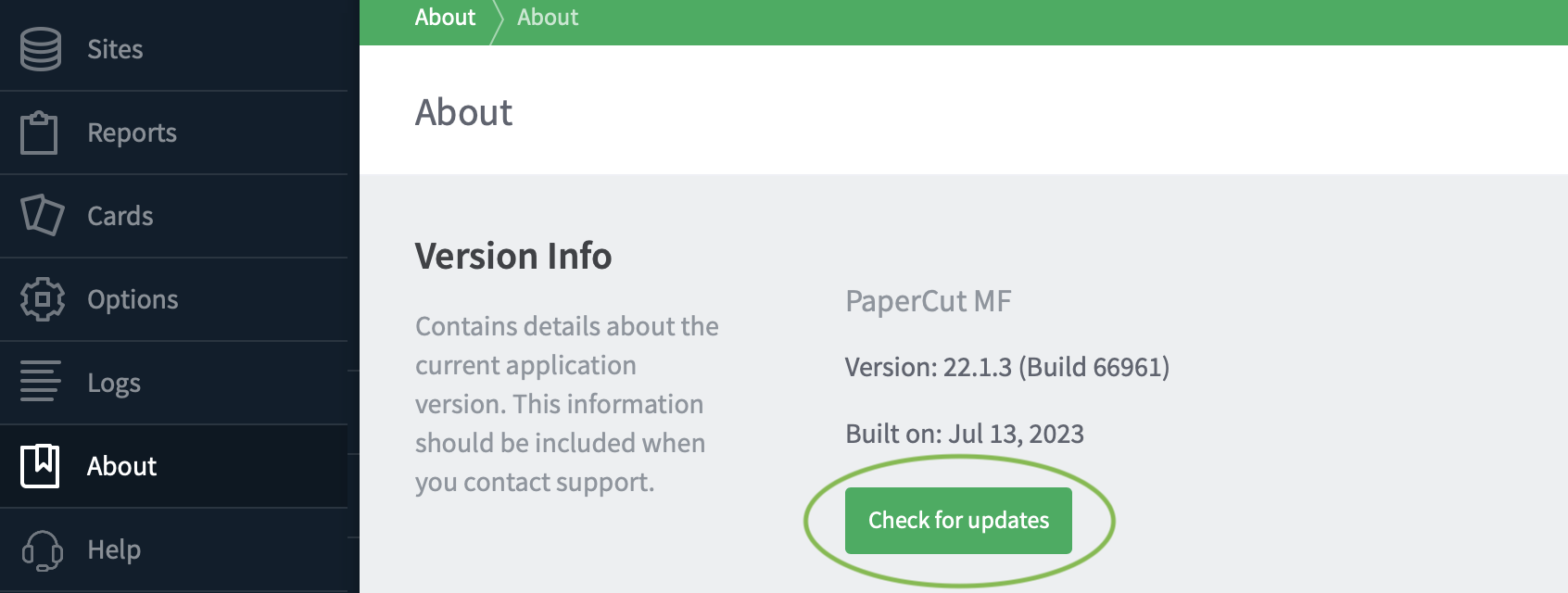
PaperCut admin interface showing the ‘About’ tab with the ‘Check for updates’ button
If you are migrating from PaperCut NG to PaperCut MF, then please contact your PaperCut Authorised Reseller for support, since there will be licensing changes needed, and device-specific steps will need to be completed to get your devices working with PaperCut MF.
Note: Upgrading instructions are the same for Linux, macOS, Windows and Novell. You just need to install the latest version “over the top”. Please follow the steps listed in the Installing PaperCut NG/MF section of the help center, for installation instructions for each operating system.′
Application Server Upgrade
-
If you’re upgrading from a previous major release (e.g. 17.x→19.x or 17.x→20.x etc), first check your eligibility to upgrade .
-
If you still use 32-bit workstations in your environment and are upgrading from version 18.3 or earlier to version 19.0 or later, also check out our End-of-life for 32-bit Operating Systems article for an important caveat on 32-bit support.
-
Schedule appropriate downtime (preferably out of hours since there will be some downtime involved when upgrading). It is suggested to choose a time of day with minimal network activity. If there is a large volume of data in the system take some time to read this article discussing database upgrade times .
-
Stop the PaperCut services running in the background. For operating system specific instructions please follow the link here .
-
As a precaution, we recommend backing up the whole PaperCut directory before beginning. Existing overnight system backups may have taken care of this task, however take a few moments to create an up-to-date backup now. For example, on Windows, create a zip archive of the directory:
C:\Program Files\PaperCut NG\(if using PaperCut NG)
C:\Program Files\PaperCut MF\(if using PaperCut MF) -
Run the installer and install into the same location as the existing install (this is especially important if you have installed PaperCut NG/MF onto a non-system disk - otherwise you’ll land up creating a parallel installation of PaperCut NG/MF).
-
After the install has completed allow a few minutes before accessing the system through the web interface. The system may need to perform a database upgrade and this will be performed in the background. If you try to access the web interface while a database upgrade is in progress, a message with the upgrade status will be displayed.
IMPORTANT: Do not shutdown the application while an upgrade is in progress. Wait for the upgrade to complete.
-
After the install is complete, log into the system and perform some tests to ensure all is working as expected and the system is monitoring user activity as expected. It’s also worth heading into the Logs → Job Log tab in the administration interface, to confirm that you can see all previous job logs in the system. Administrators may find the post upgrade test plan useful too.
Note: Sites running on Novell OES Linux are also advised to restart their iPrint Print Manager.
Note: Sites running on Microsoft Cluster servers should consult the documentation in Upgrading PaperCut MF/NG in a Microsoft Cluster Environment .
Site Server Upgrade
Site servers should now be upgraded to the same version as the primary server (see the Site Server Installation section of the help center for instructions).
Note: Until Site Servers are upgraded to match the same version as the Application Server they’re connected to, any site servers associated with the Application Server will continue to run in offline mode, with reduced functionality (see the Site server offline section of the help center for more information about what functions are available or not).
Additional component upgrades
It’s highly recommended that any ‘other’ components (secondary servers, release stations, user clients, sandbox web servers, payment gateways and devices) are also upgraded at the same time as the Application Server. However in most cases this isn’t critical.
We make sure that there is basic backward compatibility for secondary servers, user clients, devices, release stations, web print servers etc - this allows upgrades involving a large number of servers, or multiple sites, to be staggered, breaking up and localising downtime. However you will likely not be able to take advantage of all the component-specific new features until those components are upgraded (for example if there is a new feature with a release station or user client, then there is a high chance that the release station or user client would need to be upgraded to make the most of that new feature.
In the sections below - those marked with a dot (·) do not need to be upgraded immediately along with the Application Server - unless otherwise advised in the release notes.
· Secondary Server upgrade
As with the Application Server, this is just a matter of installing the latest version ‘over the top’ of the current version on the Secondary Server (normally used on your Print Servers). It’s the same process as Installing a Secondary Server , but all your previous configurations and log files will be retained during the upgrade, so you don’t have to re-apply any configuration again after the upgrade.
You don’t need to reboot the print server as part of the upgrade, but it is worth doing the upgrade out of hours because the upgrade process will stop and start the Print Provider service. This means that jobs may get through without being tracked, or may print to the wrong place (or not print at all) if your users continue to print while the Print Provider service is stopped.
If you’re wondering how to get the software, check out this article on Getting the Secondary Server Software . If you have just done the Application server upgrade above, you already have the installer that you need to do the upgrade on the secondary server too.
If you’re using Linux, it’s also worth checking out the Linux Secondary Server upgrade article.
· Release Station upgrade
Depending on how you have Installed your release station you may either have to do nothing (yay!) if you are running the release station software directly from the release station share on the Application Server, or, you may have to copy the latest release folder (under [app-dir]/release) from the Application Server to the Release station - as documented in the installation instructions.
If you are copying the entire folder over and running the release station locally, it’s worth taking a backup of the following files, and restoring them after the directory copy, so that you retain all your previous settings:
[app-dir]/release/connection.properties
[app-dir]/release/config.properties
· Web Print Sandbox server upgrade
Again, just like the Application Server upgrade or Secondary Server upgrade, for the Web Print Sandbox Server upgrade you just need to run the PaperCut NG/MF installation package and then follow the Web Print Sandbox Server install directions, to install over the top of your current install on the Sandbox Server - make sure to select ‘Web Print server installation (sandbox mode)’ when running the installer for the Web Print Sandbox Server!
Note that if you’re running Web Print in Default mode , then the upgrade was already taken care of as part of the Application Server upgrade.
· User client upgrade
Check out our separate article on Upgrading the PaperCut client software .
· Payment Gateway upgrade
Download the latest version of the gateway from the Payment Gateway Setup and Installation page (Step 2), and perform the upgrade just like the original installation.
It’s also worth taking a backup of the config files for the gateway that you’re using, so that you can copy these back into place after the re-installation:
[app-dir]/server/lib-ext/ext-payment-gateway.properties
[app-dir]/server/lib-ext/ext-payment-gateway-xyz.properties (where xyz is the config file name for your gateway - e.g. blackboard for the blackboard gateway)
· Device upgrade
PaperCut MF users should now follow any upgrade instructions outlined in the embedded solution documentation for their devices. Your PaperCut partner/reseller will also be able to provide an appropriate resource to assist with this procedure - their contact details can be found in the PaperCut Administration Console, under the ‘About’ → ‘Support’ section.
Upgrade Process (Video walkthrough)
If you’re interested in a video of the upgrade process, the following runs through an Application Server upgrade of PaperCut NG/MF:
Troubleshooting upgrade problems
See our Troubleshooting upgrade issues
Frequently asked questions (FAQs)
Do I need to pay for the upgrade?
Are my job logs / job data / user balances / transaction history and printing history kept when performing an upgrade?
How do I make sure that I’m eligible for the upgrade?
Can I upgrade straight from e.g. 16.x to 19.x?
Go straight for it! PaperCut is designed to support “install over the top” upgrades from any version to any newer version.
We recommend to take a backup of your server, or PaperCut install beforehand.
For significant jumps between versions, we also recommend optimizing your database beforehand.
Do I need to upgrade my server before upgrading PaperCut NG/MF?
Will my 32-bit servers and workstations still work?
Are there any known issues that I should know about before upgrading?
Where can I get the latest update from?
Can I upgrade the Application Server but keep the clients and secondary servers on a previous version?
The PaperCut Application Server is designed to be backwards compatible, so you can have a newer version of the Application Server being used with older versions of the Secondary Servers, Release Stations, and Clients for the purposes of the upgrade (note, Site Servers are not on this list - they need to be upgraded at the same time as the Application Server).
However, we highly recommend upgrading those other components to match the primary Application Server as soon as possible, so that you gain the benefits of upgrading all the components in your environment.
You cannot have an older version of the Application Server being used with a newer version of the Secondary Server, Release Station, or Client software.
Comments