Contents
Script for Time-Based Printer Access
THE PAGE APPLIES TO:




Contents
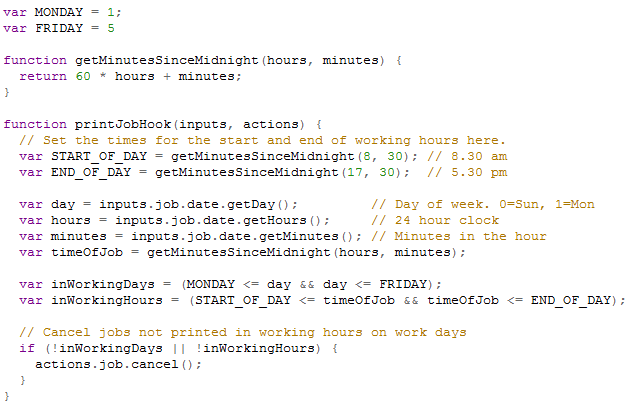
Below is an example of a PaperCut script that controls printer access based on the time of day and the day of the week. (It is a screen capture so it cannot be copied and pasted into a PaperCut script window).
The script shows the basic principles of time-based control of print jobs in PaperCut.
- job date/time is in inputs.job.date
- inputs.job.date is a java.util.Date
- day codes are 0=Sun, 1=Mon, 2=Tue etc.
- a 24 hour clock is used.
This script will cancel all print jobs that were submitted to the PaperCut printer it belongs to if they occur outside of 8.30 am to 5.30 pm Monday to Friday.
Categories: How-to Articles , Print Queues , User Management
Keywords: scripting , advanced scripting
Last updated March 15, 2024
Comments