



The PaperCut NG/MF activity tracking and charging is implemented using 100% server-side technology. The User Client software is not required as part of the activity monitoring process.
The User Client facilitates four tasks:
-
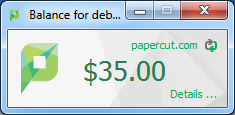
Allows users to view their current account balance via a popup window.
-
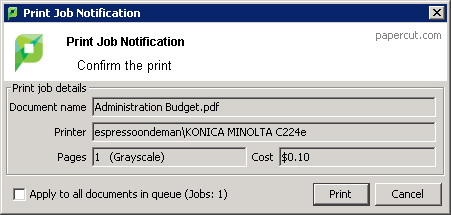
Provides users with a “last chance” before printing, confirming what they are about to print.
-
Displays system messages such as the “low credit” warning message or print policy popups.
-
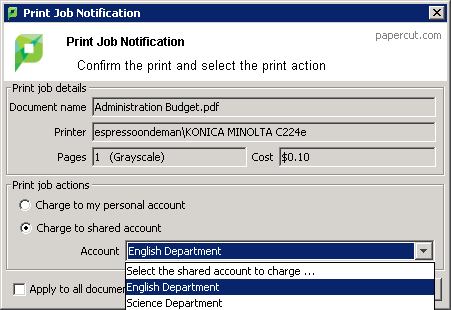
Allows users configured with Account Selection options (or you have print scripts) that require user interaction that can ONLY be done via the User Client (and cannot be done at the printing device). In this case, if the User Client is not running, the user is unable to carry out the configured user interaction for Account Selection, and the job remains paused and does not appear on the printing device.
The User Client is available for most major platforms. For more information about installing the User Client, see:
The User Client software is installed automatically on the server under the [app-path]\client directory. On a Windows based server this directory is automatically shared in read-only form providing network users with access to the client executables.
The following sections contain further information about the User Client:
-
Configure the User Client using the command-line —command line and configuration options, such as where on the screen the User Client pops up or which option is selected by default.
-
Customize the User Client —customization of the User Client.
User Client unavailability alert on Dashboard
You can configure PaperCut NG/MF to display an alert log in the Dashboard’s Real-time Activity gadget, when the User Client is detected as being unavailable (either because users are not running it or it has not been deployed and installed). This is useful in environments where users are configured with Account Selection options that require user interaction that can ONLY be done via the User Client and not at the printing device (the ability to assign accounts at the printing device is available). This is because, in such environments, the unavailability of the User Client prevents users from being able to carry out the user interaction required for Account Selection via the User Client. As a result, their print jobs remain paused in the print queue and do not appear on the printing device. These jobs are eventually canceled after the User Client timeout or the Unreleased Held Jobs timeout.
To enable the Dashboard’s Real-time Activity gadget to display an alert log when the User Client is unavailable:
-
Click the Options tab. The General page is displayed.
-
In the Client Software area, select the Show a Dashboard log when the client is unavailable, preventing account selection option.
-
Click Apply.
User Client timeout
If users are configured with Account Selection options that require user interaction that can be done ONLY via the User Client (and not at the printing device), and users do not respond to the Account Selection’s user interaction on the User Client, then after a defined time, their print jobs are automatically deleted. This is to prevent a buildup of old jobs in the print queue. The default timeout is 10 minutes.
Change the timeout as follows:
-
Click the Options tab. The General page is displayed.
-
In the Client Software area, in Delete jobs awaiting popup response after, enter the number of minutes to wait for a user to respond to the Account Selection user interaction on the User Client, after which the job is deleted.
-
Click Apply.
Authentication
Depending on the settings on the application server, the client can automatically log in as the user detected on the computer, or it may prompt the end user to enter username and password to authenticate.
As of PaperCut 23.0.3, multi-factor authentication (MFA) is supported by the user client if your organisation is syncing users and groups from Azure Active Directory, or Azure AD.
This of course, requires appropriate setup on the Options > User/Group Sync page on the app server and users and groups synced from the Azure AD.
This means a couple of things:
- Whenever username and password are required to authenticate a user, the user client now accepts log in attempts that require MFA. When MFA is required, a browser window on the user’s computer will pop open and take the user through the MFA process with Microsoft. These scenarios may include client initial login, the authentication dialogue when printing to an “unauthenticated printer” which requires login every time a job is sent to it, or the account selection dialogue if the user is allowed to and also chooses to “print as another user”;
- If the organisation allows it, when users use their UPNs to log onto an Azure AD-joined PC, the user client launched after that may be able to detect the UPN from the Windows OS, and log the user in straight away without asking for their username or password. This option is by default switched off.
Comments