SQL Server log files (LDF files) are growing large.How can I shrink them?
THE PAGE APPLIES TO:




Contents
The log file is maintained by SQL server, and managing its size is a SQL Server administration issue. The LDF file is the transaction log that allows you to perform “point in time” restores if you have system failures. The way it works is that you can restore from your last full backup and “replay” the transactions from the transaction log file. All of this sounds great, but you really need to be geared up to support it. For example, if your transaction log files are stored on the same disk as your database, then if something goes wrong you’ll lose the database and the logs. So if you really want to use these, then you need to implement “transaction log shipping” which moves transaction logs to another system.
If you don’t want to use point-in-time recovery then you can disable it completely. This means that SQL won’t bother to create the transaction logs at all. You can do this by changing the recovery model to Simple. See the description here. See screenshot below.
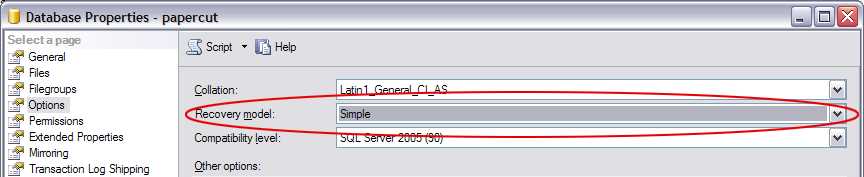
If you do want to use transaction logs. You need to manually “truncate” them after your backup procedures. Various issues around handling and truncating log files can be found in the SQL server KB article here.
Disk Full Errors
If your log files are full or you’ve run out of disk space on your database server you may receive errors like the following within PaperCut:
The transaction log for database is full.
or
Could not allocate space for object ‘x’ in database ‘y’ because the ‘PRIMARY’ filegroup is full.
or
The transaction log for database ‘papercut’ is full. To find out why space in the log cannot be reused, see the log_reuse_wait_desc column in sys.databases
If you receive these errors:
- Check the database recovery mode (as described above)
- Clean up any old transaction log files that are no longer needed.
- Verify that your SQL Server installation has enough disk to cater for database growth.
Categories: How-to Articles , Databases
Keywords: large log file , SQL log file size , shrink log , logging
Last updated March 15, 2024
Comments