Users cannot log in to PaperCut web interface
THE PAGE APPLIES TO:




If users cannot log in to the PaperCut web interface, the administrator should check the PaperCut application log for errors that could be causing the problem. If errors are occurring they should help in understanding why logons are failing.
Check the easy stuff
- Is it possible the user is mistyping their password? We’ve all done it. Check that NUMLOCK key.
- Does the user account exist in PaperCut? Make sure the username in PaperCut matches what the user is inputting.
- Is the user’s account disabled or locked out in the sync source (e.g. Active Directory)?
- Is this happening to users specifically with an account synced from Active Directory? If so, check Troubleshooting Active Directory Authentication / AD login issues.
- Is this happening to users specifically with an account synced from Google Cloud Directory, AKA G-Suite? If so, check Google Cloud Directory Troubleshooting.
AcceptSecurityContext failed with 80090302
One rare error that occurs when running PaperCut on Windows systems, is the following:
AcceptSecurityContext failed with 80090302. Please check this user's machine logon restrictions.
This error can be caused due to NTLM security policy settings.
Address this by modifying the specific NTLM settings listed below:
- “Network security: Restrict NTLM: Incoming NTLM traffic: Allow all”
- “Network security: Restrict NTLM: Outgoing NTLM traffic to remote servers: Allow all”
AcceptSecurityContext failed with 80090304
One common error that occurs when running PaperCut on Windows systems, is the following:
AcceptSecurityContext failed with 80090304. Please check this user's machine logon restrictions.
This error can be caused because the user logging in was restricted so they could only “Log on to” some machines on the network. If the server running PaperCut was not in that list, then the logon would fail.
To check/fix this:
- Open the “Active Directory Users and Computers” tool
- Select the user that gave you the error, right-click and select Properties.
- Select the “Account” tab.
- Click the “Log On to” button (see below)
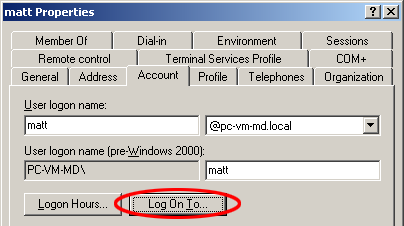
- By default all users can log in to all computers. But if you have the “This user can only log in to the following computers” option enabled, make sure that the PaperCut server is in the list. It is safe to add the PaperCut server to this list, because you can always restrict local login access to that server using group policy.
- Next click on the “Logon Hours…”. Verify the user is allowed to log on at all times.
- NOTE: If you have multiple domains, you must check these settings for users on all your domains.
Changing this for the users with the problem will resolve the logon issue.
AcceptSecurityContext failed with 80090311
Customers have from time-to-time reported a range of similar issues, often using your favorite search engine and the error code will give you an indication as where the problem may be.
AcceptSecurityContext failed with 80090311. Please check this user’s machine logon restrictions.

Please confirm the Windows ‘Netlogon’ service is running.
Other customers have reported that disjoining the server from the domain and re-adding it fixed this issue.
Categories: Troubleshooting Articles , User Interface
Keywords: authentication , invalid username and password
Last updated March 15, 2024
Comments